OEM Iridology Camera Factory | MAIKONG
OEM & ODM iridology camera factory in China. Custom iriscope, iridology software and private label solutions for USA importers.

Iris reading chart — a concise clinic‑ready guide for Canadian holistic practitioners
November 6, 2026
Quick answer
An iris reading chart is a practical visual map used in comparable provider to record and compare observable features of the iris (zones, collarette, pigments and surface patterns). In clinic, you should treat the chart as a reference tool to organise observations, improve repeatable image comparison and support client education — not as a diagnostic replacement for medical tests. Use a clear capture workflow, standard orientation and consistent lighting so photographed irises can be matched reliably to the chart during or after a consultation.
Contents
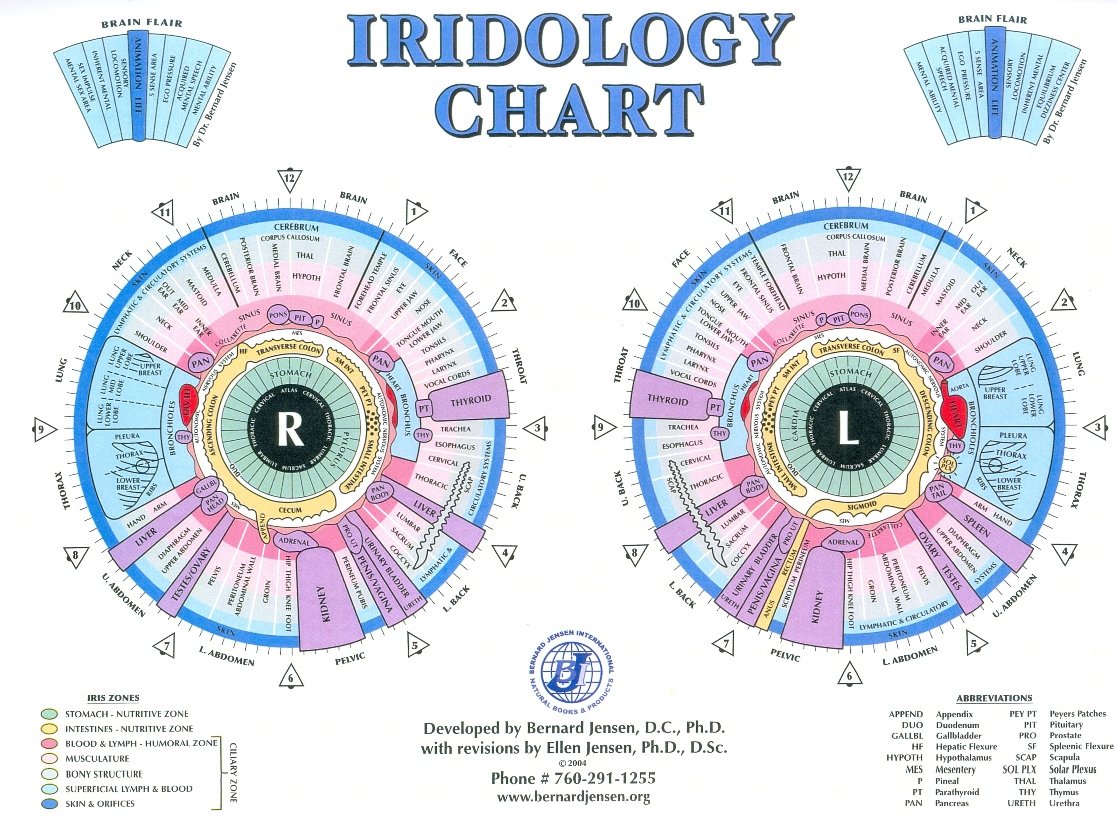
Visual reference: what a usable iris reading chart must show

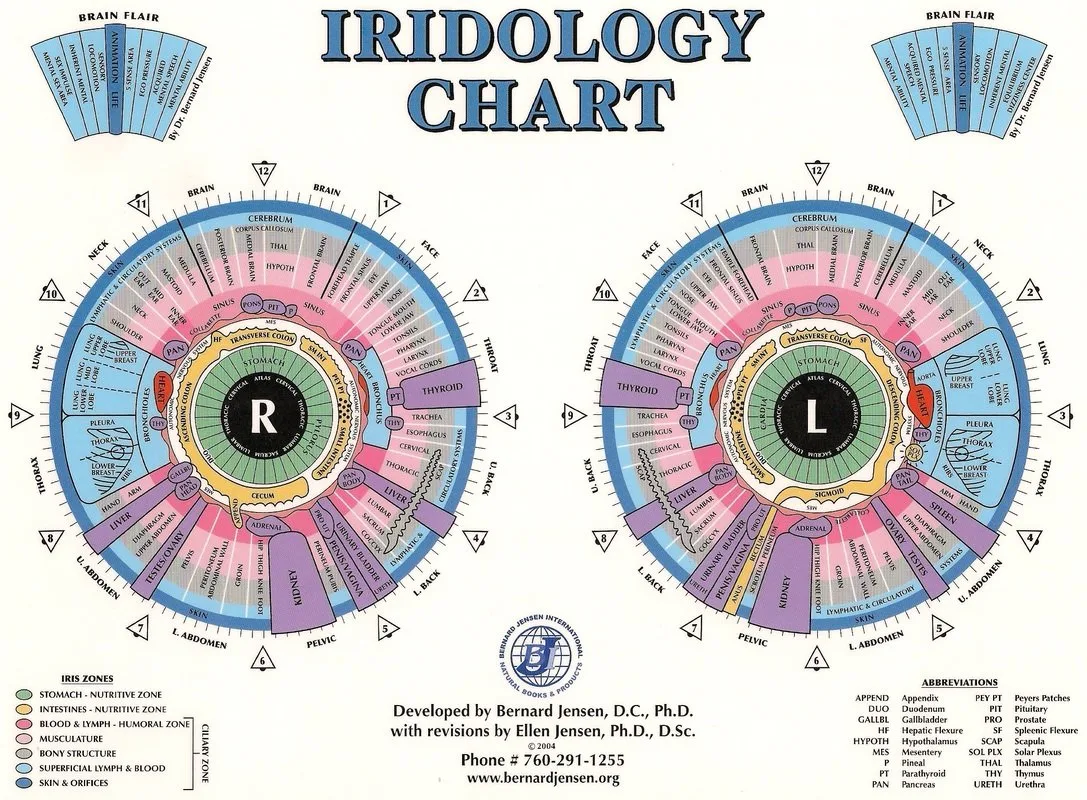
A usable chart shows the iris divided into concentric zones, a clear pupillary margin and collarette boundary, common pigment markers (spots, cords, crypts) and space for practitioner annotations (date, eye left/right, camera settings). If your chart lacks these elements it will be harder to match photographs reliably in a consultation.
Core components explained
Zones
Charts use concentric rings to relate iris sectors to body regions (head, thorax, abdomen, limbs). In practice, consistent sector numbering and orientation (e.g. 12 o’clock = superior) is what allows you to compare images between visits.
Pupillary margin and collarette
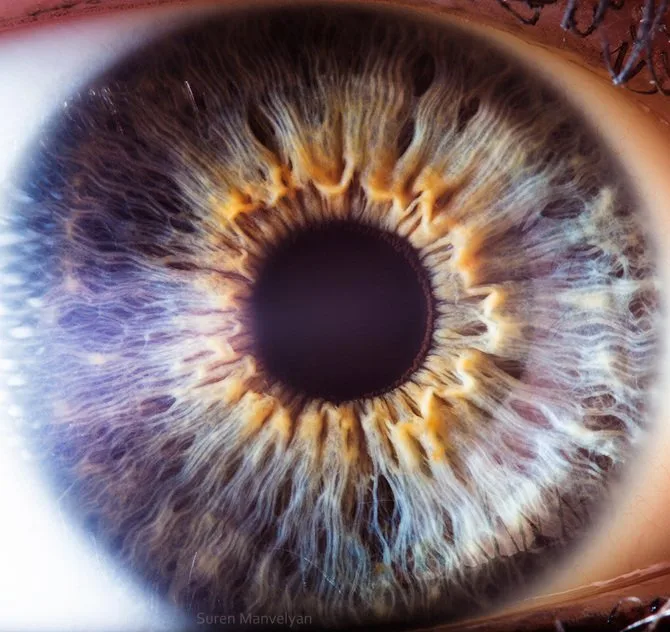
The pupillary margin is the inner ring bordering the pupil; the collarette (the thick circular band) is often the most information‑dense area. Stains, lacunae and contraction furrows near these landmarks are commonly noted on charts.
Stroma, pigments and other markers
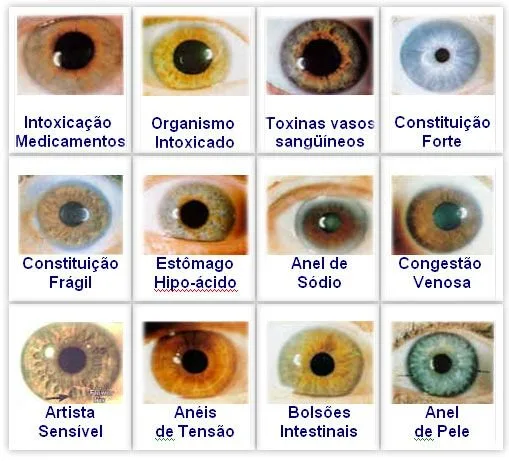
Stroma refers to the fibrous texture of the iris. Charts commonly include symbols or colour keys to mark:
- Pigment spots and nebulae (dark granular marks)
- Crypts and lacunae (openings or darker wells)
- Radii, spokes or nerve‑like fibres
Annotation keys
A simple legend reduces ambiguity: eye (L/R), date, magnification or camera model, sector numbers, and your symbol set for signs (e.g. small dot = pigment, hollow circle = lacuna). If you use software, verify that the annotation set matches your printed chart.
One‑page clinic workflow: use of an iris reading chart during consultation
We recommend a reproducible, brief workflow so the chart becomes a clinical habit rather than a distraction.
- Consent & context: Briefly explain the chart’s role, confirm consent to photograph the eyes and record the session in the client file.
- Capture: Photograph each eye using the capture requirements below. Label files immediately with client ID, eye (L/R) and date.
- Initial match: Place the live or on‑screen image beside the chart; orient both images so the 12 o’clock position aligns.
- Annotate: Mark notable pigments, crypts and collarette changes directly onto the chart or into your software’s annotation layer.
- Record plan: Note follow‑up actions (monitoring, referral, nutritional suggestions) and store the annotated image and chart snapshot in the client record.
Minimum image and capture requirements to match client photos to a chart
Reliable matching depends more on consistency than on a single numeric spec. Aim for these practical minimums:
- Focus and detail: Sharp resolution enough to resolve stromal fibres and pigment granularity at your usual consultation magnification.
- Illumination: Diffuse, neutral (white) illumination that avoids specular reflections on the cornea; a ring LED or polarised filter helps.
- Orientation: Capture with the eye looking straight into the camera; align the 12 o’clock position and record whether the image is mirrored.
- Scale and file naming: Include an on‑image scale or metadata that records magnification. Name files by clientID_eye_date to avoid mix‑ups.
- Consistency: Use the same device or set of settings for repeat visits so differences reflect the iris, not the camera setup.
If you already use a comparable provider camera or iriscope, confirm that the software exports images with orientation and metadata preserved so your chart and stored photos align.
Common mistakes when matching images to a chart — and how to avoid them
- Misaligned orientation: Rotated photos produce false sector differences. Solution: use a fixed camera mount and mark the 12 o’clock reference on your capture screen.
- Variable lighting: Shadows change apparent pigment density. Solution: standardise lighting (same lamp, diffuser and camera aperture) for all clients.
- Poor focus or motion blur: Small features disappear. Solution: stabilise the camera and allow the client to blink between captures to reduce reflexive movement.
- Unclear annotation keys: Team members interpret symbols differently. Solution: keep a printed legend in the clinic and the same annotation palette in your software.
Real‑world use scenarios: three practical ways to use an iris reading chart in a session

1. Baseline intake and client education
Use the chart to show clients where you’ll focus observations and to explain what features you will record. The visual map helps set expectations and secures consent for photographic records.
2. Tracking over time
Place annotated charts from successive visits side by side to document progression or stability of visible signs. This is useful for monitoring responses to nutritional changes or lifestyle interventions, provided you maintain the same capture protocol.
3. Teaching and student practice
A consistent chart and image library form the backbone of classroom exercises in chart reading and sector identification. Make sure students learn your clinic’s annotation standard before interpreting images clinically.
Selection criteria: printed chart vs digital charting software

Choose the format that fits your workflow and recordkeeping system.
- Printed chart: Low tech, ideal for quick bedside notation and teaching. Check print scale, durable paper and an included legend.
- Digital charting software: Better for archive-search, side‑by‑side image overlays, and multi‑practitioner consistency. Confirm compatibility with your capture device, whether it preserves orientation metadata, and available language/localisation for Canadian English.
If you use both, ensure your digital symbols and printed legend are identical so annotations transfer without interpretation errors.
Training and professional scope in Canada
Effective chart use requires training in iris anatomy, the symbol set you use, photography technique and recordkeeping. Seek recognised comparable provider courses or accredited training programmes to learn systematic observation, sector mapping and how to document findings properly (see our internal primer comparable provider chart how to read).
Respect professional scope: comparable provider is a complementary practice. Practitioners must not present chart observations as medical diagnoses or make claims that exceed their regulatory authority. When clinical signs or health concerns arise, refer clients to an appropriately regulated healthcare professional.
Evidence and reasonable expectations
Historical development: over time observations of iris features produced increasingly detailed iris charts and different schools of comparable provider contributed systems of analysis. These charts are tools for observation and pattern recognition rather than medical tests.
Reasonable expectations: an iris chart helps organise visible iris features, standardise recording and support client communication. It does not diagnose disease, replace laboratory testing or substitute for medical assessment. Keep records of capture settings and annotations so future comparisons reflect true ocular changes rather than technical variation.
Limitations and risks to manage
- Interpretation is observer‑dependent; intra‑ and inter‑practitioner variability is a known limitation.
- Technical inconsistencies (lighting, orientation, focus) can mimic or hide features; strict protocol reduces this risk.
- Regulatory and scope‑of‑practice boundaries in Canadian provinces vary — practitioners are responsible for compliance with local rules.
Quick checklist: prepare a chart‑based consultation
- Private, well‑lit room and diffuser for consistent lighting
- Capture device mounted or stabilised; note device and settings
- Printed chart and legend or digital software ready with annotation palette
- Client consent form that mentions photography and record storage
- File naming convention and secure storage plan for images and annotated charts
Related resources
For practical reading and printable maps see our internal pages: comparable provider chart, left eye comparable provider chart and comparable provider chart how to read.
Next step — request configuration advice or a quote
If you want help matching capture equipment to a chart workflow, email us with: intended use (clinic, school or demo), destination (Canada), preferred chart format (printed or digital), whether you have sample images and the approximate quantity required. Email: lucy@myiridology.us
Important disclaimer
Important Disclaimer: Content on this page is for educational and informational purposes only. It does not constitute medical advice, diagnosis or treatment. comparable provider is a complementary wellness practice and should not replace professional medical evaluation. Our comparable provider products are professional imaging tools; users should obtain appropriate training and ensure compliance with local regulations and professional requirements in Canada.
This content is provided for learning, information sharing and professional communication only. It is not medical advice and is not a basis for treatment or diagnosis. Confirm suitability, operation and purchasing requirements against the product manual, local regulations and qualified professional guidance.
Related resources
Related resources
MAIKONG IRIDOLOGY CAMERA
MAIKONG IRIDOLOGY SOFTWARE Installation and operation
Exhibition


Company Certificates


Contact US Online WHATSAPP:

Maybe you like also
Copy©2026-2027