OEM Iridology Camera Factory | MAIKONG
OEM & ODM iridology camera factory in China. Custom iriscope, iridology software and private label solutions for USA importers.

Using an Iridology Iris Eye Chart: A practical guide for Canadian naturopathic clinics
November 21, 2026
Quick answer
a comparable provider iris eye chart is a visual map that links iris sectors to body regions and constitutional markers used in comparable provider practice. For naturopathic clinics in Canada it is a reference tool for note-taking, client education and training — not a diagnostic instrument. Choose a chart that matches the comparable provider system you use, pair it with a reliable image capture method, and verify the chart’s provenance and any software compatibility before purchase. We summarise what to check, where charts help in clinic workflows, and the limits and risks you must communicate to clients.
Contents
What is a comparable provider iris eye chart?
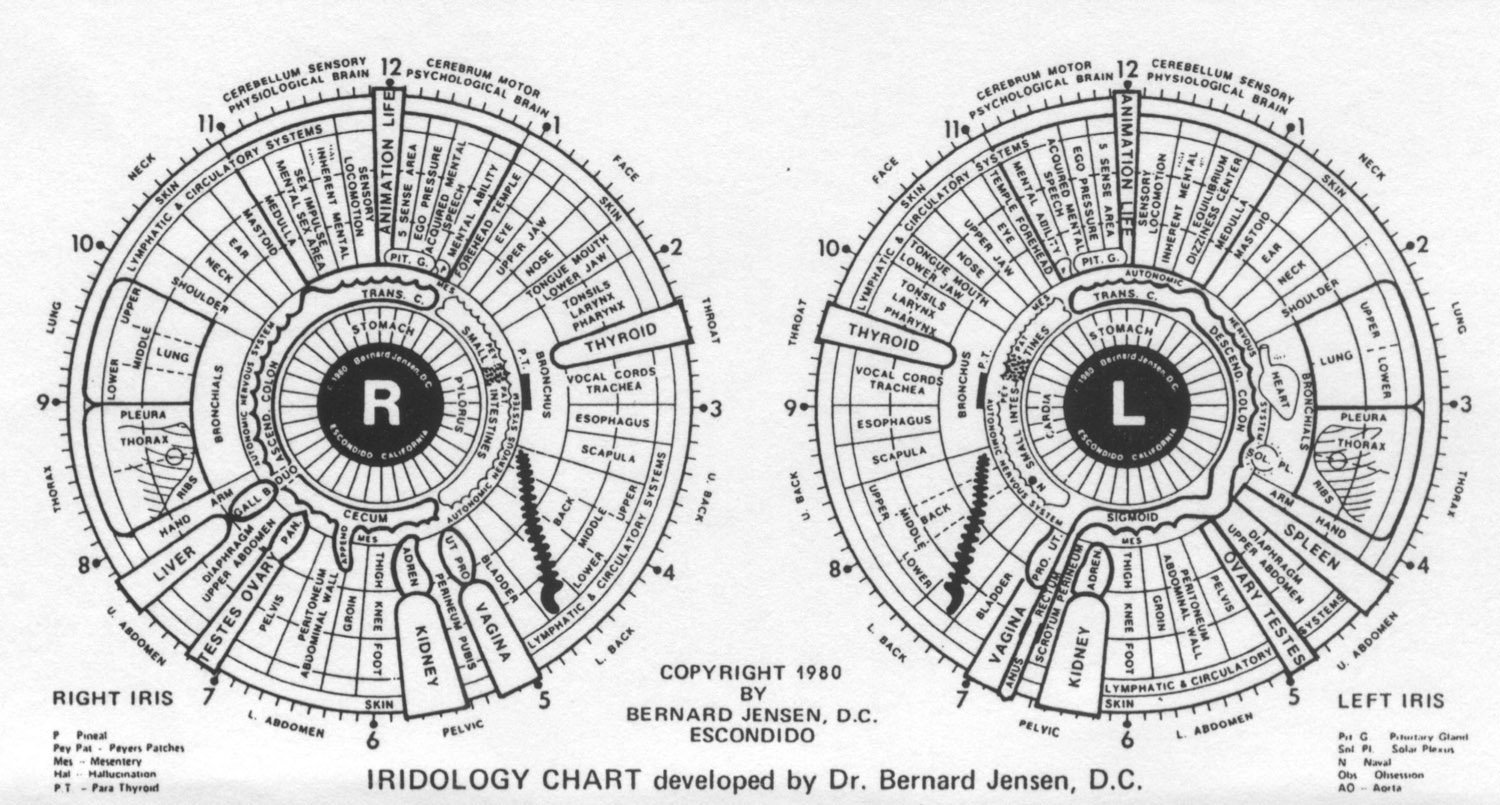
a comparable provider iris eye chart is a schematic overlay showing how different parts of the iris correspond to anatomical regions and constitutional signs as defined by a given comparable provider school. Charts typically illustrate zones for organs, limbic rings, structural markings and colour/texture keys used by practitioners to record observations. They are teaching and recording aids — visual shorthand for the examiner and an explanatory graphic for clients.
How naturopathic clinics usually use an iris chart
In routine naturopathic practice an iris chart is most useful as a structured shorthand during an intake or a follow-up. Common workflows include:
- Photograph the left and right iris with consistent illumination and focal distance, then overlay the chart to mark observed signs during consultation.
- Keep annotated iris images in the client file to document change over time (for example constitutionally stable features versus transient pigmentation or vascular markings).
- Use a chart as an educational aide when explaining constitutional tendencies or lifestyle recommendations — making clear that the chart supports discussion, not clinical diagnosis.
Who should use an iris chart — and who should not
An iris chart is appropriate for trained iridologists, naturopathic clinicians who include comparable provider in their complementary assessment toolbox, and educational programmes teaching comparable provider concepts. It is not appropriate as a standalone diagnostic report, nor should it be used by untrained staff to make clinical decisions.
Boundaries and risks to communicate to clients
comparable provider is a complementary practice. It does not replace medical examinations, laboratory testing or imaging. Misrepresenting an iris chart as a diagnostic instrument risks client harm and regulatory issues — clinics in Canada should ensure all client-facing materials state limits clearly and advise clients to seek medical assessment when indicated.
Which parameters, evidence and certifications to check before adopting a chart or system
When evaluating an iris chart or a packaged comparable provider solution for clinic use, verify these items:
- Provenance and method: Which comparable provider system does the chart follow (for example zonal mapping, limbic ring nomenclature, colour classification)? Ensure it matches your training.
- Image capture compatibility: If you plan to use digital images, confirm the chart or software supports your camera’s output (file formats, resolution and overlay functionality).
- Software language and OS support: Check the analysis/reporting software supports your clinic computers and the languages your staff and clients require.
- Supplier declarations and quality marks: Ask for supplier-declared certifications and quality processes. MAIKONG declares ISO 9001, CE and ISO 13485 for its product lines; treat these as supplier statements to inspect rather than medical approvals.
- Training and documentation: Confirm what training, manuals and sample charts are included so staff can use charts consistently.
Practical example: when a chart is sold together with a camera and software
Many modern comparable provider packages bundle a printed or printable chart with an iris camera and analysis software. These add value only if the parts integrate reliably. For example, we manufacture comparable provider cameras and can confirm model specifications where supplied; these matter because image quality affects the utility of an overlay chart.
| Model | Sensor / resolution | Illumination | Software / languages | Supported systems | Warranty |
|---|
The table above summarises supplier-declared parameters you should verify against your clinic needs. For example: higher pixel counts and controlled illumination improve the clarity of small iris markings; multilingual software matters in clinics serving multilingual patients in Canada; and macOS compatibility is important if you use Apple workstations. These are supplier details, not clinical endorsements.
Three practical selection insights we recommend
- Match chart style to your training. comparable provider systems differ (mapping, nomenclature and interpretation). Use the same chart family your practitioners trained with to avoid inconsistent notes.
- Prioritise consistent imaging. A printable chart is only as useful as the photos it overlays. Use fixed focal distance, stable illumination and repeatable client posture to reduce interpretation variability.
- Keep record-keeping explicit. Store annotated images with date, lens/illumination settings and the practitioner’s initials. That preserves traceability and supports both training and client follow-up.
Common mistakes clinics make — and how to avoid them
- Avoid using different chart systems across practitioners; agree on one standard and document it in your clinic protocol.
- Do not rely on poor lighting or low-resolution photos; they create artefacts that mimic or obscure iris signs.
- Label client-facing charts and reports carefully: state that charts are interpretive references and list referrals and standard-of-care triggers for medical assessment.
Software, files and the printable chart
If you plan to use a printed or printable chart alongside digital images, confirm the software supports:
- Overlay alignment and scaling (so the chart lines up correctly on images of varying eye size).
- Exportable annotated reports you can include in client records.
Checklist: what to request in a Canadian RFQ or information request
When you ask a supplier for information, include:
- Which comparable provider chart system is provided and a sample PDF of the printable chart.
- Exact camera model, image sensor type and sample unedited iris images at the same distance you will use in clinic (left and right iris).
- Software name, supported OS versions, language pack availability, and whether overlay alignment is manual or automatic.
- Training options and sample user documentation.
- Warranty terms and available after-sales support or spare parts in Canada (or import support).
- Shipping packaging and lead time to Canada.
Useful resources and internal links
For a deeper primer on chart reading and training, see our comparable provider Course and the comparable provider Chart how-to pages on our site:
comparable provider Course,
How to read a comparable provider chart,
and the general comparable provider hub.
Evidence and supplier-declared facts used in this article
One responsible next step for clinics in Canada
If you want a sample printable chart, integration details for a specific camera model, or a quote for clinic deployment, email our sales contact with: intended use (education or clinical record-keeping), preferred camera model (if any), quantity, and the destination province in Canada. Use the contact below so we can provide the accurate configuration information you need.
Email us: lucy@myiridology.us — or visit our contact page: contact. Phone/WhatsApp for international enquiries: +86 135-1090-7401.
Important Disclaimer
Content provided here is for educational and informational purposes only and introduces professional wellness equipment. It does not constitute medical advice, diagnosis, or treatment. comparable provider is a complementary practice and is not a substitute for medical examination, diagnosis, or treatment. Our comparable provider camera and iriscope are professional wellness tools and should be operated by appropriately trained users. Ensure use complies with all applicable Canadian laws and professional requirements.
This content is provided for learning, information sharing and professional communication only. It is not medical advice and is not a basis for treatment or diagnosis. Confirm suitability, operation and purchasing requirements against the product manual, local regulations and qualified professional guidance.
Related resources
Related resources
- USB vs networked iris camera interfaces: a practical guide for Canadian naturopathic and comparable provider clinics
- comparable provider Eye Health Mapping for Canadian Naturopathic Clinics — Practical, Clinic-Ready Guidance
- Practical guide to the left‑eye comparable provider map for naturopathic clinics in Canada
MAIKONG IRIDOLOGY CAMERA
MAIKONG IRIDOLOGY SOFTWARE Installation and operation
Exhibition


Company Certificates


Contact US Online WHATSAPP:

Maybe you like also
Copy©2026-2027