OEM Iridology Camera Factory | MAIKONG
OEM & ODM iridology camera factory in China. Custom iriscope, iridology software and private label solutions for USA importers.

Iris Chart: What Canadian healthcare equipment importers need to know
October 9, 2026
Quick answer
Yes — you can source and supply usable iris charts for Canadian clinics, provided the chart includes the exact visual elements listed below (orientation marks, sector grid, legible legend and scale), is delivered in print/vector formats and transparent-overlay digital files, and carries wording that avoids diagnostic or medical claims for Canada.
Contents
What an iris chart is and how clinics will actually use it in Canada
An iris chart is a standard visual reference that maps the iris into zones and segments clinicians or educators use alongside iris images. Clinics in Canada use charts for teaching, record-keeping, side‑by‑side comparison and as an overlay on iris photographs. Charts are a reference tool — not a diagnostic test — so buyers must ensure marketing and packaging do not present charts or associated software as medical devices unless formal regulatory approval exists.
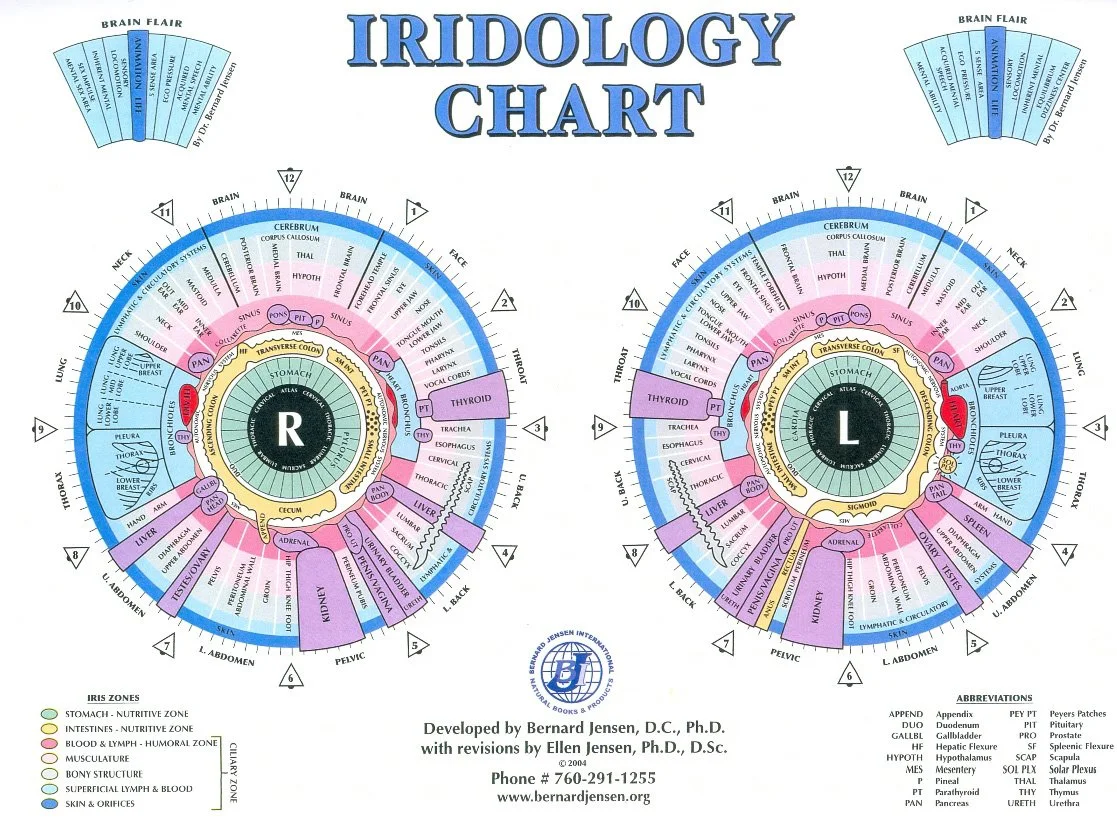
Required visual reference (explanatory_image): the exact elements every usable iris chart must show
For importers to evaluate a delivered chart immediately, insist the supplier provides a single explanatory image (printed and digital) that demonstrates the chart at readable scale. A usable chart must include:
- Central iris map with concentric rings (pupil, inner/outer iris) and a clearly readable sector grid dividing the iris into zones.
- Orientation markers for left and right eyes (explicit “L” and “R” positions) and a clear “patient-facing” orientation arrow so staff do not flip images when filing.
- A concise legend naming zones used by your clinicians (e.g., “Zone 1 – Pupillary”, “Zone 4 – Peripheral”) and a colour key if colours encode meaning.
- Ring or scale reference allowing the overlay to be sized to match captured iris photos (for print: a visible scale bar; for digital: a documented pixel/mm or percent scale).
- Contrast and colour fidelity adequate for photographic overlays — avoid muddy gradients; lines and labels must remain legible at the sizes you plan to print or display.
We include a sample software screenshot from our library to show how a chart should look when ready to overlay on captured images: 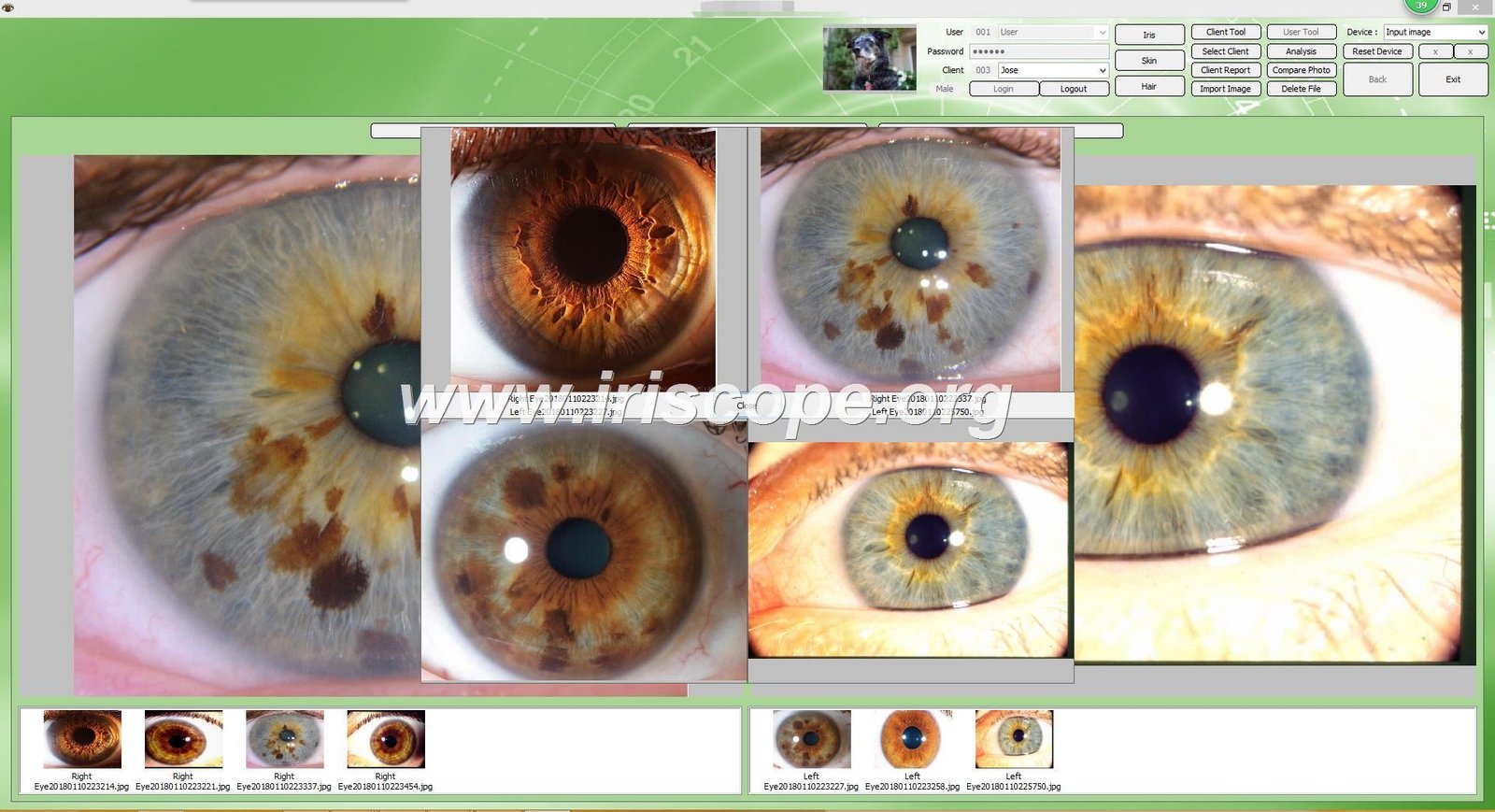
Formats and file specifications importers should request — practical file types and resolution guidance
Ask suppliers for a small set of canonical deliverables so your clinics and software teams can work without conversion errors:
- Vector master: PDF (vector) or SVG. Use this for print-to-size, re-labelling, translation and high-quality laminated charts.
- Transparent overlays: PNG or SVG with transparent background sized to the camera capture ratio used by your iris devices.
- High-resolution raster for print: TIFF or high-quality PNG at 300 dpi for the largest printed size you expect to produce.
- On-screen preview: sRGB PNG or JPEG at 72–150 dpi for EMR previews and training slides.
- Simple metadata file: a one-page TXT or JSON describing the chart orientation, intended overlay scale (e.g., “overlay anchors to pupil centre, scale 1:1 at 300 dpi”), and permitted languages for label text.
| Format | Use | Minimum/Recommended |
|---|---|---|
| Vector PDF / SVG | Print, re-labelling, translation | Vector (no rasterisation) |
| High-res TIFF / PNG | Physical posters, laminated charts | 300 dpi at final print size |
| Transparent PNG / SVG overlay | Software overlays, reports | Match camera capture ratio; provide metadata |
Orientation and labelling rules for clinic use: right vs left eye, patient record conventions and printable sizes
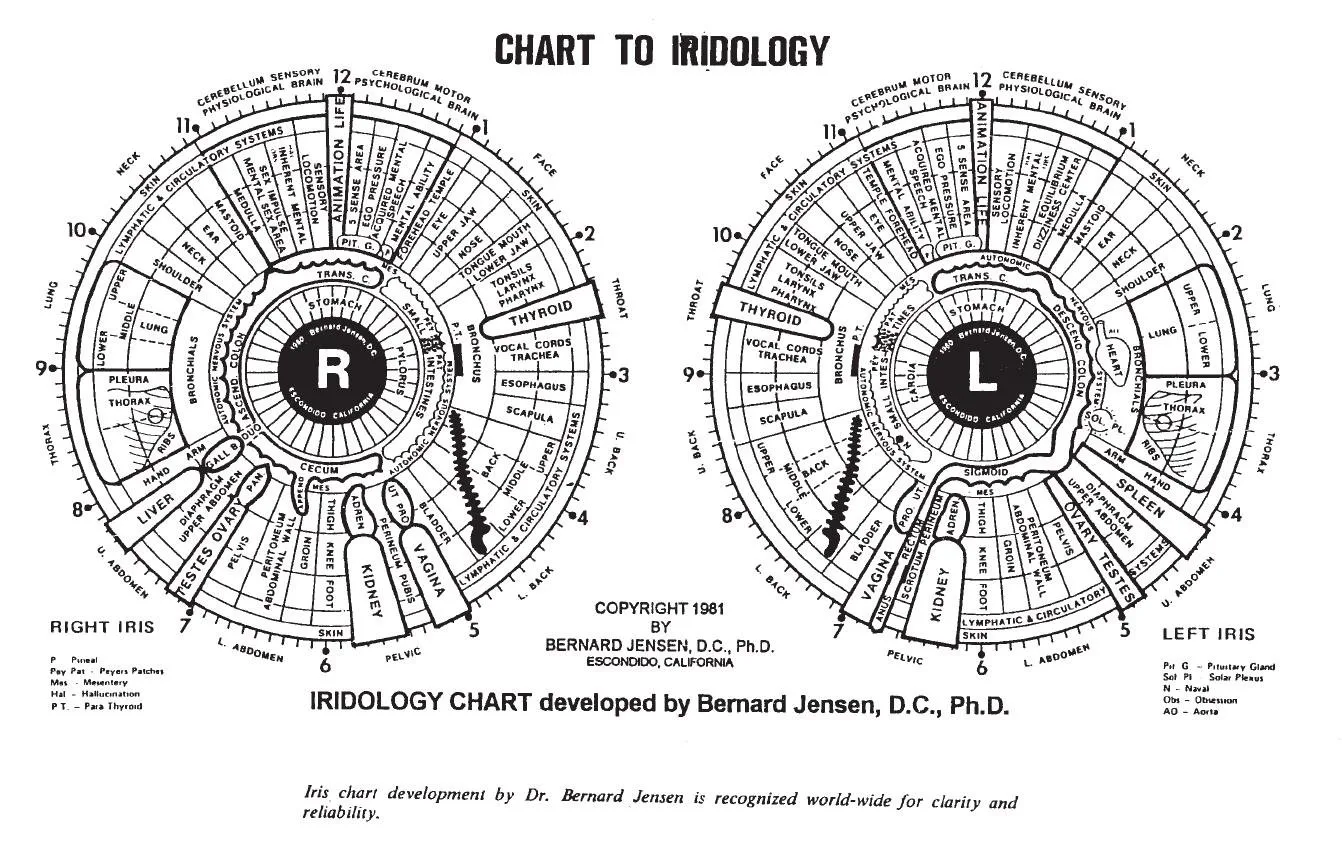
Two practical rules prevent filing errors and software mismatch:
- Always supply distinct left-eye and right-eye versions labelled “L” and “R” on the same corner and add a patient-facing orientation arrow. Many errors happen when a single symmetrical chart is used without explicit left/right marks.
- Document the expected printable diameters: common clinic poster sizes are A3 and A4; overlays should be provided at a scale that lets the software anchor at the pupil. For printed charts, request a bleed-safe vector sized to A3 (297 × 420 mm) so it can be reduced to A4 without loss of legibility.
For electronic record-keeping, adopt a file-naming convention and include the eye side and language code (for example: iris-chart_R_en-CA.svg) to keep multi-site deployments consistent.
Localisation for the Canadian market: language, units, legal/wording limits and compliant product descriptions
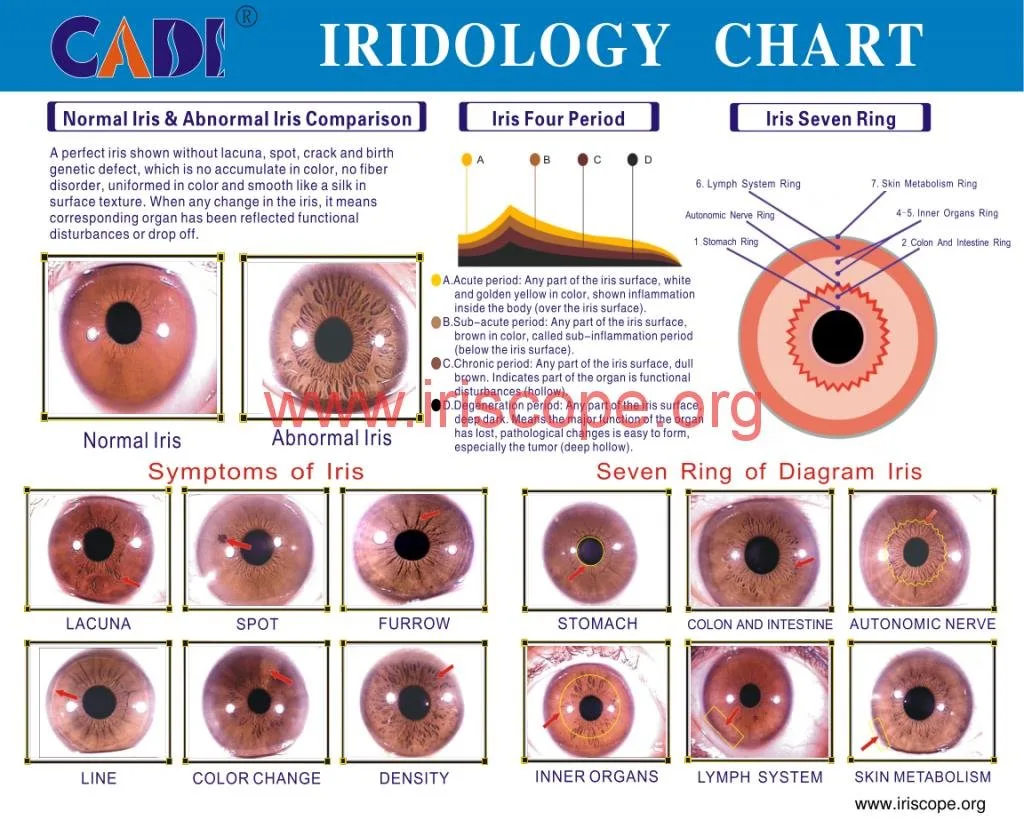
Canadian clinics expect English and often French versions. Localisation steps importers should require:
- Provide label translations into Canadian English and, if you sell in Québec, Canadian French. Keep translations in the vector file as separate text layers to allow client edits.
- Avoid clinical or diagnostic wording on charts and packaging. Use neutral language such as “Reference Map”, “Training Chart”, or “Iris Sector Overlay”. Do not claim the chart diagnoses conditions. If you plan marketing copy that suggests health interpretation, consult legal counsel and avoid implying Health Canada approval unless you hold formal evidence.
- Declare MAIKONG’s self-reported factory certifications where relevant (we declare ISO 9001, CE, ISO 13485) as supplier information, but do not suggest these confer regulatory medical device status in Canada without separate approvals.
Integration with iris imaging software and overlays — what chart formats work with capture software and report tools
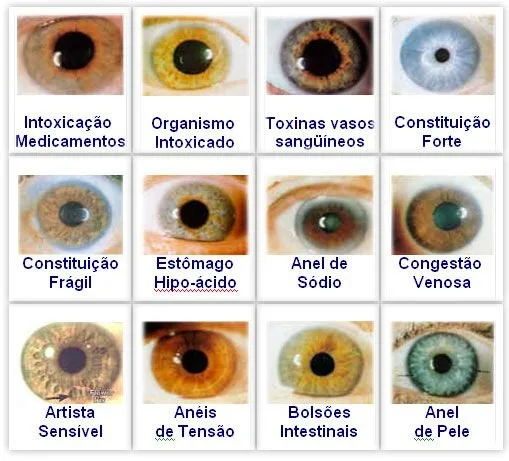
Practical compatibility depends on whether the comparable provider camera or software supports vector overlays or anchored raster overlays. Ask your software partner which overlay anchors they support:
- If the capture software anchors to the pupil centre and scales by pixel diameter, request an overlay with documented anchor points and transparent background (PNG or SVG) and a metadata file stating the anchor coordinates.
- If the software accepts vector overlays (SVG/PDF), this is preferable: vectors scale cleanly and keep text editable for translation and rebranding.
- When dealing with legacy Windows-only software, confirm whether it accepts PNG overlays or requires a proprietary overlay format — missing that check is a common integration blocker.
Selection checklist for importers
Use this checklist when you examine samples or request quotations.
- Visual fidelity: Are lines, sector numbers and legends legible at A4 size?
- Colour management: Is a colour profile supplied? Do test prints match the digital proof?
- Scale and anchors: Does the overlay include documented anchor points or a scale bar?
- File set: Does the supplier provide vector master + transparent overlay + high-res raster + metadata?
- Material and finish (for printed charts): paper weight, lamination option and UV-resistant inks for posters placed near windows.
- Software compatibility: Confirm with your camera/software vendor what overlay types are accepted.
- OEM/ODM options: Can the supplier re-label, add your logo, supply bilingual text and provide print-ready masters?
Real-world workflows: three suitability scenarios showing an iris chart in use
1) Clinic intake (static clinic desktop)
Workflow: Capture both irises with a USB iriscope → apply transparent overlay in software anchored to the pupil → annotate findings in the clinic record (text only) → store overlayed images in the patient file. Chart requirement: transparent PNG or SVG and metadata for anchor points.
2) Training class (projector and handouts)
Workflow: Trainer projects vector chart on screen and uses high-resolution print handouts for students to mark zones during exercises. Chart requirement: vector PDF for projection plus A3 printable master and second-language layer.
3) Mobile consultation (tablet + portable iriscope)
Workflow: Technician captures iris with a mobile camera, overlays a low-resolution PNG for in-consult review, and later syncs higher-res files to central EMR. Chart requirement: lightweight PNG overlay sized to mobile capture and a server-hosted SVG master for record archival.
Common mistakes importers must avoid
- Accepting a single raster file only — it limits translation and scaling. Always require a vector master.
- Missing explicit left/right labelling — leads to patient record errors.
- Supplying overlays that lack anchor coordinate documentation — integration fails or creates misaligned overlays.
- Using chart copy or packaging that implies diagnosis or medical claims for Canada — this creates regulatory and commercial risk.
Maintenance, stock and restock considerations for printed charts and digital assets
For printed stock, plan minimum reorders around clinic headcount and poster placement: durable laminated posters for public areas and cheaper A4 handouts for staff use. For digital assets, ask the supplier for a version history, clearly labelled master files and a backup copy in your cloud storage with access control. Maintain a master vector file to avoid repeated raster exports that degrade quality.
Evidence and asset use: how to include supplier images and owned materials in listings and training
Use supplier-supplied images only with written permission. When you incorporate a supplier screenshot or product photo into training or catalogue pages, include the image source and retain the original asset metadata. We can provide factory images from our owned materials library for use in product pages and training; examples from our collection are available for review (sample images used above: comparable provider chart) .
Evidence
Our guidance draws on standard imaging and print practices and on MAIKONG’s product and asset set for comparable provider cameras and software. Company-declared certifications: ISO 9001, CE, ISO 13485 (company declaration). For product images and software screenshots we can provide factory-owned assets on request; see our image examples in the article.
Risks and limitations
Charts and overlays are reference materials; they are not diagnostic devices. We do not assert Health Canada approval for any chart or associated software. If you need charts labelled or marketed as medical devices in Canada, that requires separate regulatory review and evidence which is not supplied here. Also, missing anchor metadata or incompatible overlay formats are common integration risks — verify software acceptance before finalising an order.
Useful internal links and further reading
- How to read a comparable provider chart
- comparable provider chart (product overview)
- Left eye comparable provider chart
- comparable provider chart right eye
Next step — request a configuration or sample
If you need a bilingual (en-CA/fr-CA) vector master, transparent overlays sized to a specific camera model, or a printed sample for proofing, contact our commercial team with the target capture resolution and example image ratio. Pricing and lead times are available on inquiry.
Contact: Lucy@myiridology.us • WhatsApp/phone: +86 135-1090-7401
Important Disclaimer: Content on this page is for educational and informational purposes and does not constitute medical advice, diagnosis, or treatment. comparable provider is a complementary wellness practice and should not replace professional medical evaluation. comparable provider cameras, iriscopes and charts are imaging tools for trained users; ensure local regulatory compliance and professional oversight when placing products in Canada.
This content is provided for learning, information sharing and professional communication only. It is not medical advice and is not a basis for treatment or diagnosis. Confirm suitability, operation and purchasing requirements against the product manual, local regulations and qualified professional guidance.
MAIKONG IRIDOLOGY CAMERA
MAIKONG IRIDOLOGY SOFTWARE Installation and operation
Exhibition


Company Certificates


Contact US Online WHATSAPP:

Maybe you like also
Copy©2026-2027