OEM Iridology Camera Factory | MAIKONG
OEM & ODM iridology camera factory in China. Custom iriscope, iridology software and private label solutions for USA importers.

Iridologist Chart: Clear, clinic-ready reference for certified iridologists in Canada
October 28, 2026
Quick answer
An iridologist chart is a standardized overlay and annotation system you use to record iris observations against photographed images. The single best way to use one in a Canadian clinic is as a locked digital overlay matched to a high-quality left/right iris capture (consistent orientation, magnification and LED lighting), stored in the client record with a short, consistent legend and date-stamped notes. That approach preserves clinical defensibility, lets you compare visits reliably, and keeps explanations clear for clients and colleagues.
Contents
Direct answer: what an iridologist chart is and the single best way to use one in a Canadian clinic
An iridologist chart is a schematic map of the iris divided into zones and keyed to common iris features (pupillary margin, collarette, stroma, pigment markers, radial furrows, etc.) that you place over a photograph of the patient’s iris to record observations consistently. The single best clinical practice is to use a software-managed overlay tied to each captured image so that every annotation is reproducible, dated, and stored alongside the original iris photo and minimal interpretive notes. This keeps visual evidence intact and supports longitudinal comparison without converting the chart into a diagnostic report.
Evidence
Standard practice among experienced clinics is to prioritise a direct image-to-overlay workflow: capture high-resolution iris photos, apply a fixed-size chart overlay, record the observation keys (colour, lesion type, location), and save the annotated image with metadata (left/right, camera model, exposure). Where we reference equipment below, those device specifications come from our MAIKONG product documentation and accessories lists.
Limitations and risks
comparable provider charts are recordkeeping and reference tools. They are not diagnostic tests. Do not present chart annotations as medical diagnoses. Accuracy of comparisons depends on consistent capture parameters; inconsistent lighting, angle, or magnification will produce artefacts that look like physiological change. Clinic teams must obtain informed consent for photography and follow provincial and federal privacy rules when storing images.
Visual reference: printable iridologist chart elements you must have

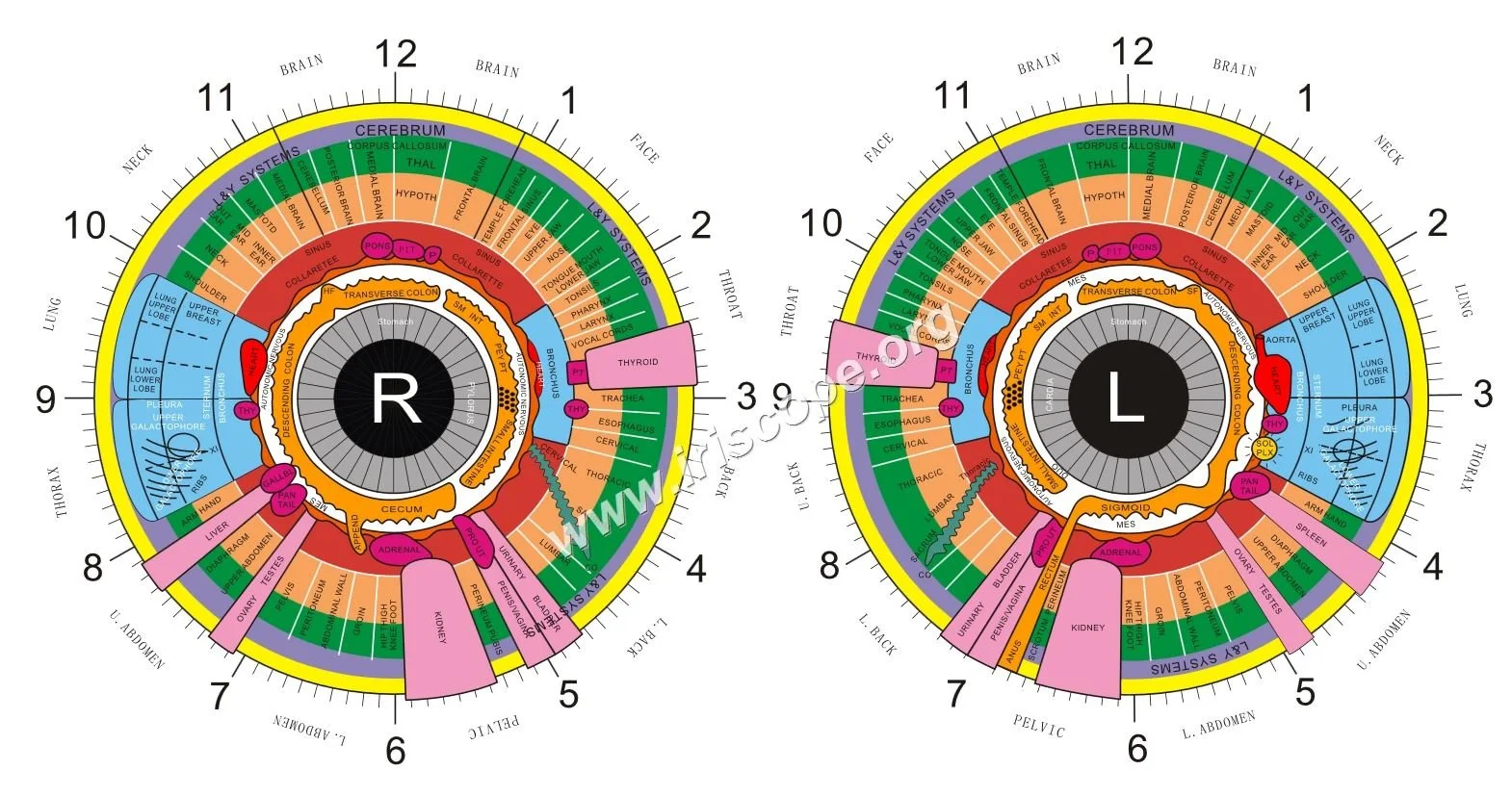
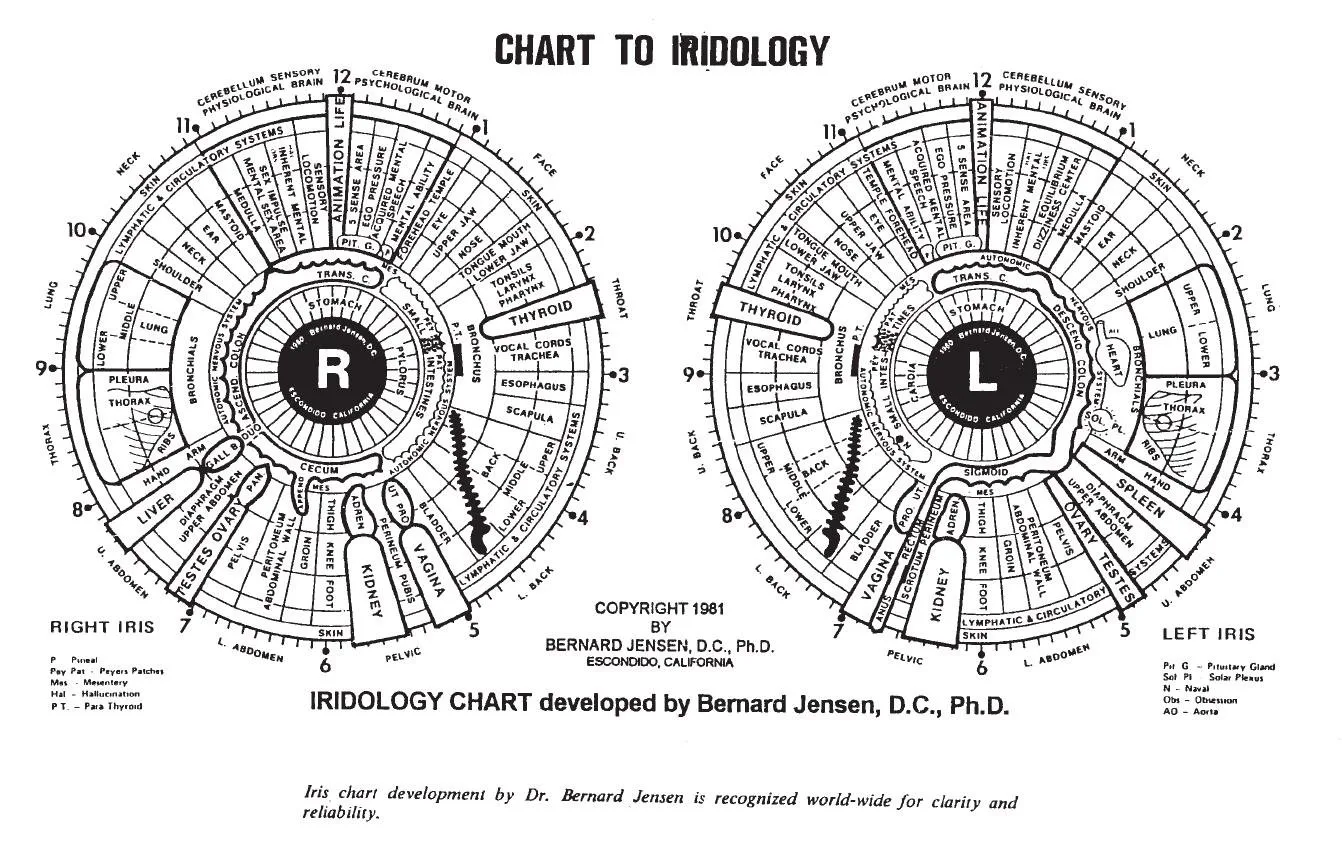
That image shows the minimum graphical elements you should include on a clinic chart: central pupillary rim, collarette outline (where visible), inner/outer stroma regions, a 12-sector clock grid, and marker symbols for pigment spots, deposits, and structural features. Keep the legend compact and consistent; longer interpretive notes belong in the consultation record, not the overlay.
Core chart components explained
Zones and the clock grid
The iris is easiest to index using a 12-hour clock overlay centred on the pupil. Mark features by clock position and radius (pupillary rim / collarette / peripheral stroma). This yields repeatable, auditable location references.
Pupillary margin and collarette
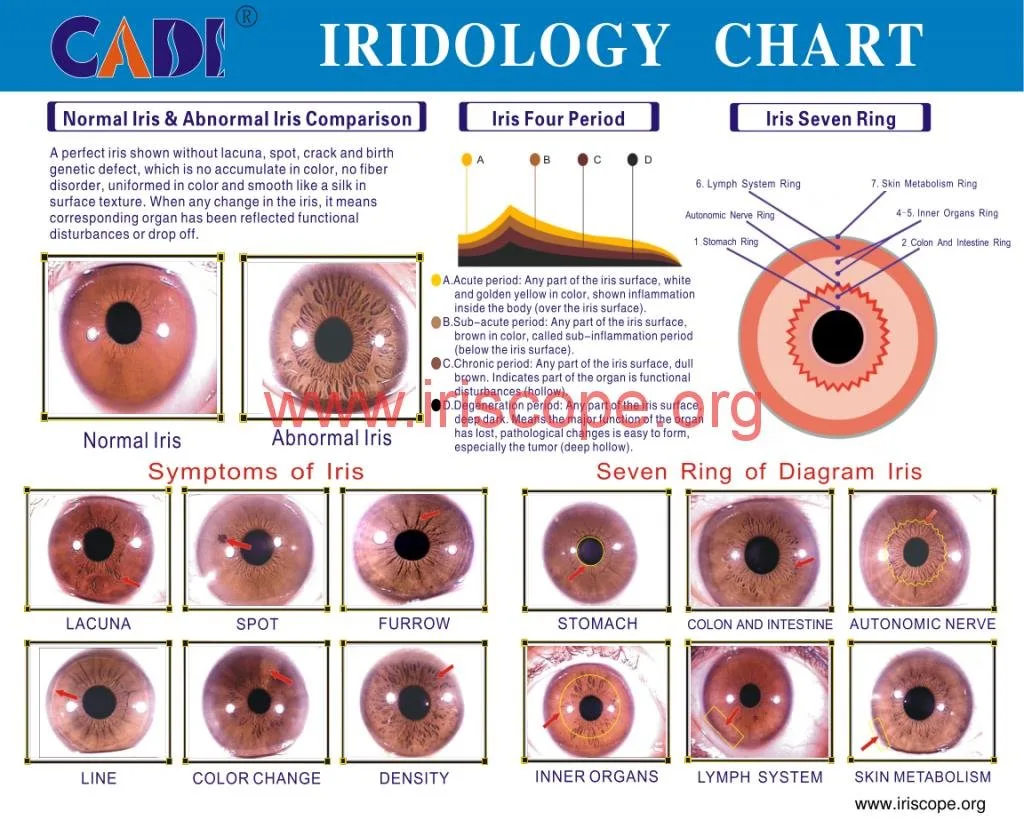
The pupillary margin is the inner rim; the collarette is the often-textured ring surrounding the pupil. Record whether the collarette is intact, fragmented, or displaced. Use separate symbols for breaks versus pigment accumulations.
Stroma, pigment markers and annotation keys
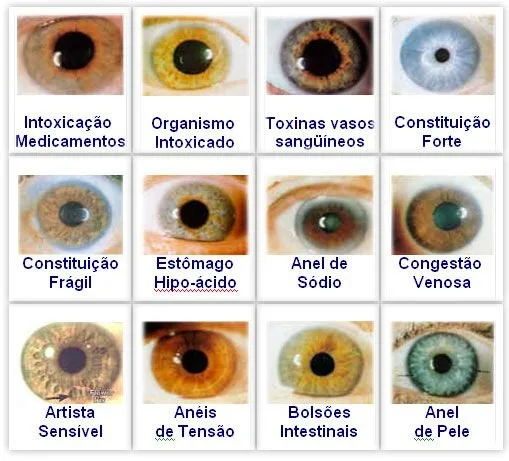
Stromal texture, colour gradients and discrete pigment markers are core observations. Our recommended minimal legend includes: P=Pigment spot, F=Furrow, R=Radial lesion, D=Depigmented area, with a size class (s/m/l) and clock position. Keep keys two‑character max for compact overlays.
How to read and record: step‑by‑step clinic workflow for consistent, defensible chart entries
- Obtain informed consent for photography and record it in the client file.
- Capture images of the left and right iris using a consistent camera-to-eye distance and the same illumination sequence. Label images L or R immediately in the capture software.
- Apply the clinic standard overlay (locked scale and orientation). Do not resize the overlay per client—use the software’s scale calibration.
- Annotate using the standard legend: clock position, symbol, and size code. Add a one-line observation (e.g., “left 3:00 P, 1.5 mm”) and your initials.
- Save annotated image and original unannotated capture together, with metadata: date, device model, magnification, and operator initials.
- Write interpretive comments in the consultation note (not on the chart graphic) and record follow-up recommendations if required by your practice scope.
Image-to-chart matching: aligning photos, orientation, magnification and lighting

Small changes in angle or lighting change contrast and can create false artefacts. Practical controls that matter most:
- Orientation: set a single top reference (12 o’clock) marker for all captures. If your capture hardware supports it, enable auto‑rotation to a standard orientation before saving.
- Magnification/scale: capture at fixed optical magnification and use a scale calibration so the overlay fits equally across patients. Never free‑scale overlays to match images.
- Lighting: use even ring illumination and a short exposure. MAIKONG cameras provide dedicated LED arrangements to reduce glare (details below), which helps standardization.
Common interpretation mistakes and how to avoid them in practice
- Mixing raw and processed images: always keep originals; annotate copies only.
- Changing overlay scales between visits: fix the overlay scale in software to avoid spurious size changes.
- Annotating without photo metadata: always tie each annotation to the source photo and capture settings.
- Using inconsistent legends: use one clinic legend and train staff on its meaning.
Using charts with comparable provider capture hardware and software
When selecting hardware and software verify three things: image resolution (for detail), controlled illumination, and software overlay support. Below are MAIKONG device facts you may find relevant when pairing a chart with capture hardware.
| Model | Main sensor / resolution | Illumination / lens | Software / OS | Warranty |
|---|
The MK 980U emphasises a simple, stable capture with a 5MP CCD and built-in LED ring; the MK-9822U offers higher pixel detail (12MP) and a larger maximum resolution (3840×2880). Match your chart detail level to the camera resolution: finer chart subzones require higher-resolution images.
MAIKONG’s supplied software (MaikongCVAdvance) supports multilingual UI and overlay functionality; confirm your chosen version supports locked overlay scales and stores original files alongside annotated exports before deployment.
Chart formats and deliverables your clinic needs

At minimum your clinic should produce and store four deliverable types for each client visit:
- Original unannotated capture (lossless where possible).
- Annotated image with clinic overlay (PNG or TIFF for print-quality).
- Software-ready project file (so annotations are editable within your capture software).
- Client-facing report page (PDF) that includes the annotated image, brief observation text and consent statement.
Printable charts should be 300 dpi at the intended print size; digital overlays should be vector or high-resolution raster to avoid scaling artefacts.
Training and documentation you should keep
Maintain simple records that support consistent practice: a clinic legend file, a capture protocol (camera model, magnification, LED settings), operator competency checklist, and sample annotated examples for training. Minimum competency documentation should include the training source and date, and a signed operator statement saying they understand the legend and capture protocol.
Sample chart legend (clinic example)
P = Pigment spot (size: s/m/l); F = Furrow; R = Radial lesion; C = Collarette break; S = Stroma opacity. Record clock position and operator initials (e.g., P@4:00,s – JS).
Canadian practice considerations: recordkeeping, client communication and compliance
Follow provincial privacy requirements and obtain explicit consent for photography and storage. Keep images encrypted or behind access controls, include a note in the client file about the purpose of the image, and retain originals per your clinic’s records retention policy. When sharing reports with clients, avoid clinical diagnostic language—focus on observations and recommended next steps within your scope of practice.
Quick checklist: what to verify before you adopt or order a chart
- Image quality: camera resolution and sensor type fit the detail you want (see MK 980U data-fact-id=”140″ and MK-9822U data-fact-id=”133″).
- Overlay language and symbols match your clinic legend and are available in English/French as required.
- Software compatibility: does the capture app support locked-scale overlays and export both annotated and original files?
- Print resolution: overlay and legend export at 300 dpi; PDF report templates included.
- Data handling: confirm the software stores metadata (operator, device, date, L/R) with each image.
Useful follow-up resources and one actionable next step
For hands-on comparison material and software questions, see our pages on comparable provider chart, comparable provider chart how to read, and the comparable provider camera page for device details.
Actionable next step: request a clinic-ready overlay file or a configuration quote tailored to your capture workflow by emailing Lucy@myiridology.us or contacting WhatsApp +86 135-1090-7401. Tell us the camera model you use (or plan to use), desired overlay scale (print size), and whether you need bilingual legend support (English/French).
FAQ
Do chart overlays need to be custom-made for each camera?
Not always. If your capture protocol uses fixed optical magnification and the software provides calibration, a single clinic overlay works. Custom overlays are necessary when you mix different camera optics or magnifications without a reliable calibration step.
Which MAIKONG model is better for fine-detail charting?
The MK-9822U (12 MP, maximum 3840×2880; data-fact-id=”133″) provides higher pixel detail than the MK 980U (5MP; data-fact-id=”140″), which helps when you plan to record very small pigment markers or subtle stromal texture. Balance that against your workflow needs, file sizes, and storage plan.
Important Disclaimer
Content provided on our website is for educational and informational purposes only and is intended to introduce professional wellness equipment. It does not constitute medical advice, diagnosis, or treatment. Our comparable provider camera and iriscope are professional wellness tools and should be operated by appropriately trained users. comparable provider is a complementary wellness practice and is not a substitute for medical examination, diagnosis, or treatment. If you have any health concerns or medical questions, please consult a qualified healthcare professional. Users, practitioners, distributors, and businesses are responsible for ensuring that use of our equipment complies with all applicable local laws, regulations, professional requirements, and health-related rules in their country or region.
Contact / next step
To request a clinic overlay file, bilingual legend, or a configuration quote for Canada, contact Lucy@myiridology.us or WhatsApp +86 135-1090-7401. Include your camera model, desired overlay print size, and whether you require Maikong software compatibility.
This content is provided for learning, information sharing and professional communication only. It is not medical advice and is not a basis for treatment or diagnosis. Confirm suitability, operation and purchasing requirements against the product manual, local regulations and qualified professional guidance.
Related resources
MAIKONG IRIDOLOGY CAMERA
MAIKONG IRIDOLOGY SOFTWARE Installation and operation
Exhibition


Company Certificates


Contact US Online WHATSAPP:

Maybe you like also
Copy©2026-2027