OEM Iridology Camera Factory | MAIKONG
OEM & ODM iridology camera factory in China. Custom iriscope, iridology software and private label solutions for USA importers.

How Canadian Distributors Should Build a Portable Iridology Demo Kit and Media Pack
October 27, 2026
Quick answer
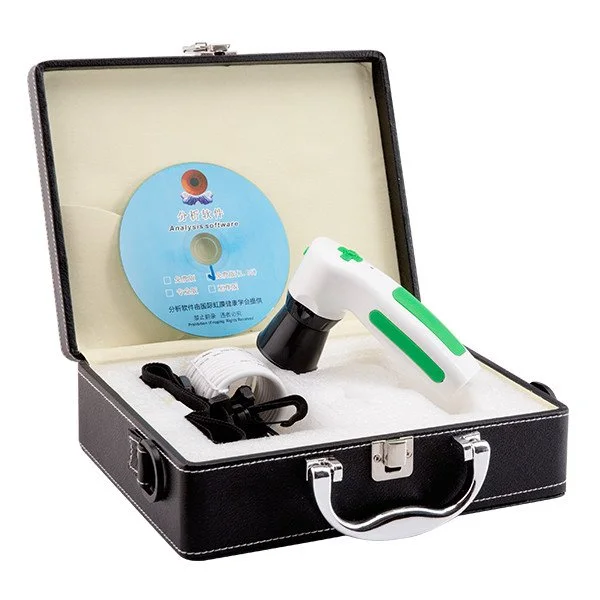
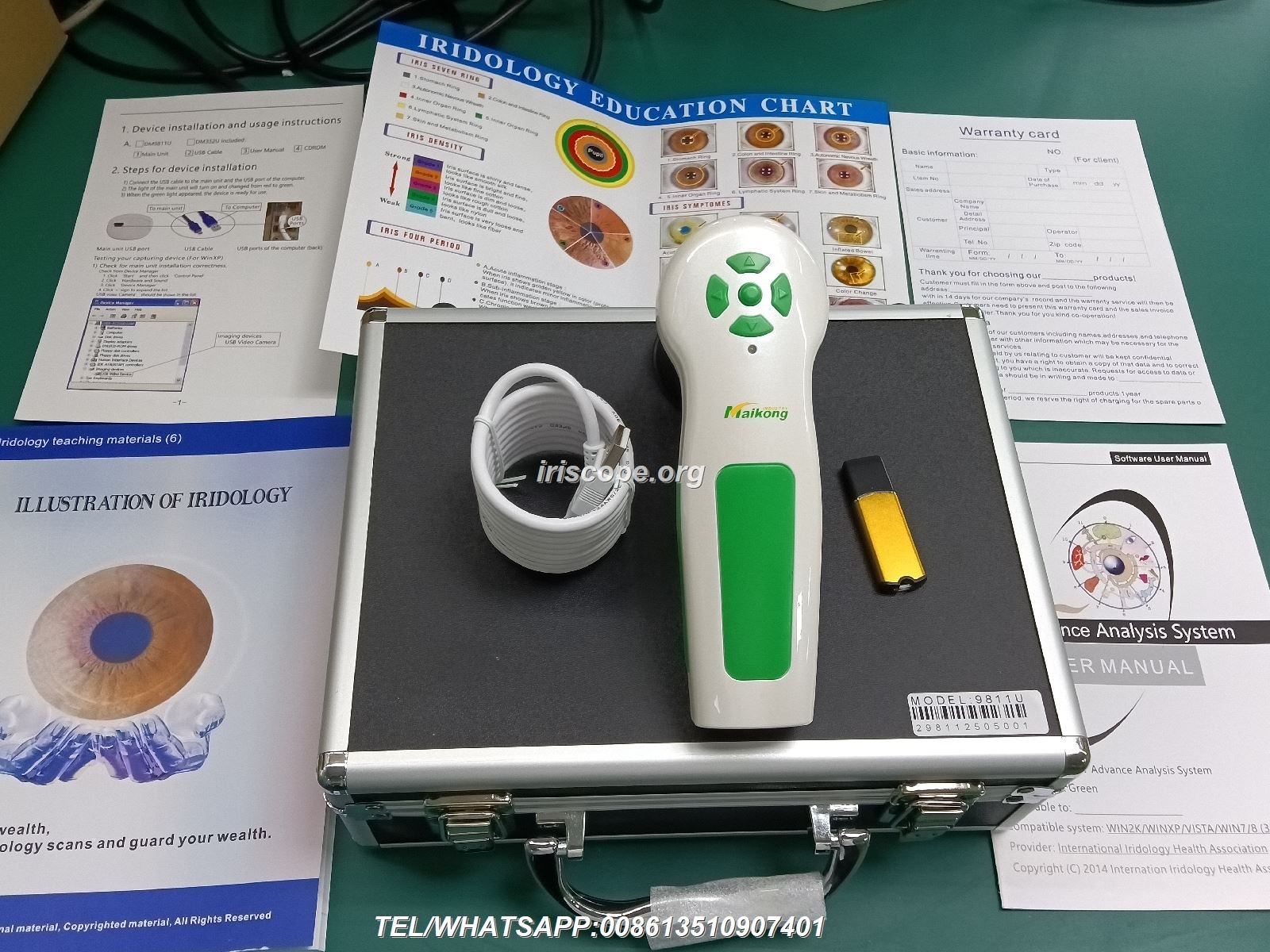
Bring one working iriscope/comparable provider camera, one fully charged backup (or a spare camera module), a compact adjustable stand, power and USB cabling plus international plug/adapters, a tablet or laptop with the capture software and several saved anonymized demo images (EN/FR). Add printed one‑pagers and a laminated comparable provider chart, a 2–3 minute scripted demo flow, consent and lead forms, and a hard-case for optics. That single checklist covers 95% of on-site demos—then choose one of three kit configurations below (Starter, Clinic Visit, Trade Show) to match the visit type and transport constraints.
Contents
Direct answer: the single checklist Canadian distributors and sales reps need to run a successful comparable provider demo
- Primary demo unit: iriscope or comparable provider camera (bring the model your rep will sell).
- Backup imaging option: second camera or camera module, or a validated high‑resolution sample set on the laptop.
- Stable, adjustable camera stand or desktop mount; small tripod for remote demos.
- Power kit: AC adapter(s), spare battery (if applicable), international plug adapters—confirm local plug type and voltage before travel.
- Connectivity: USB cable(s), short and long, labelled for Windows and macOS if supported; Ethernet or Wi‑Fi dongle if needed.
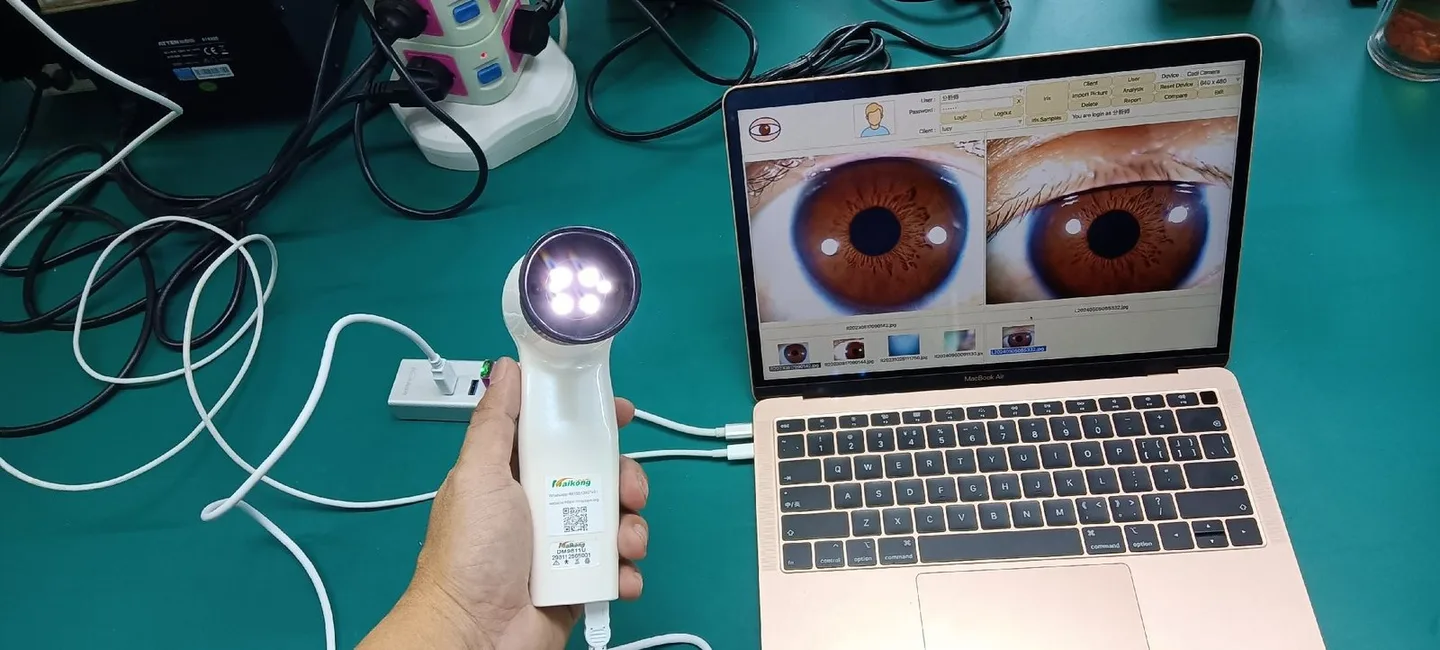
- Computer: laptop or tablet with the capture software preinstalled, licence active, and recent software update applied; at least one fully charged spare battery pack.
- Demo data: 8–12 anonymized, high‑quality iris images (EN/FR captions), 1–2 sample client profiles for the software demo.
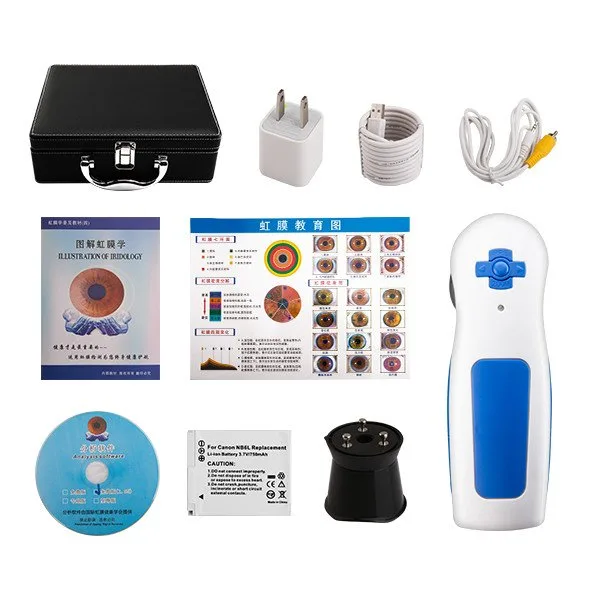
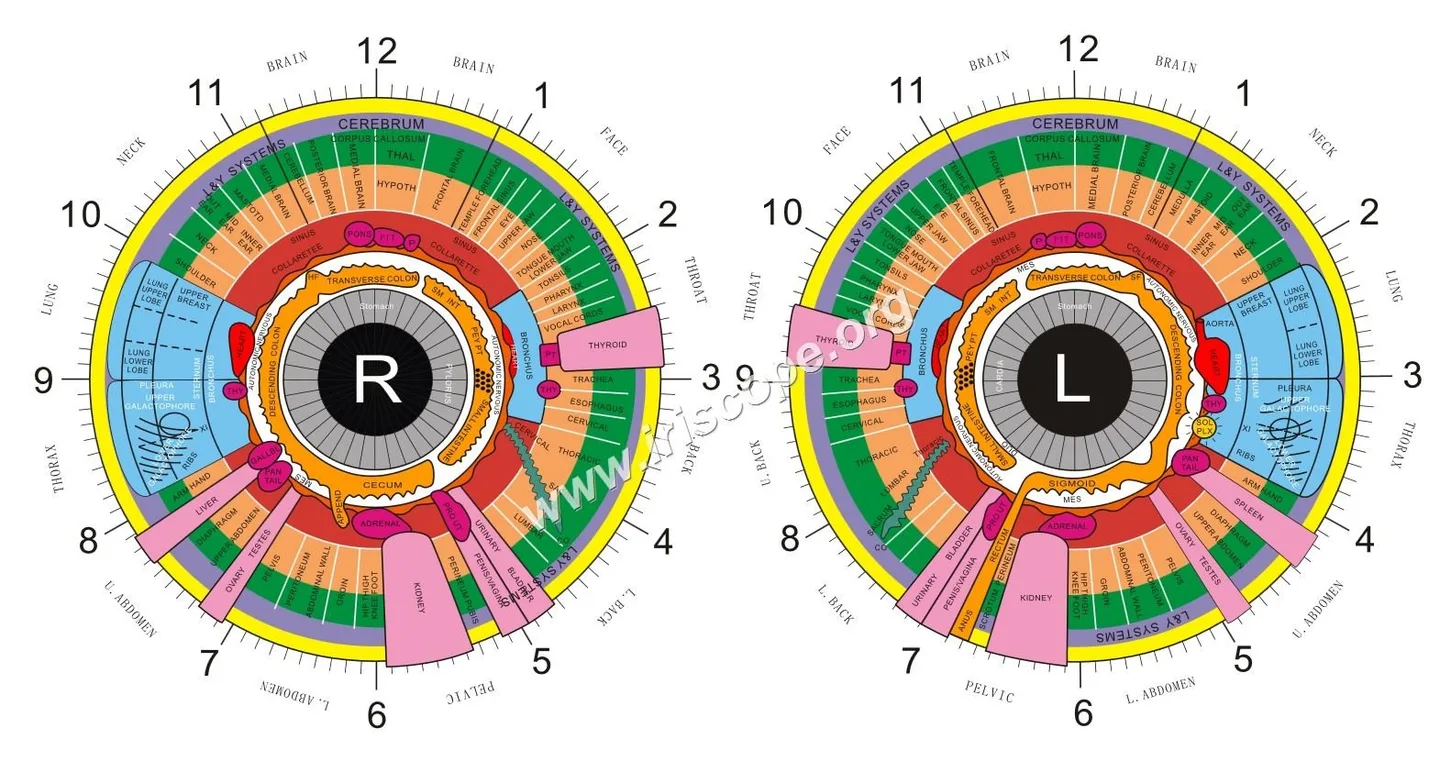
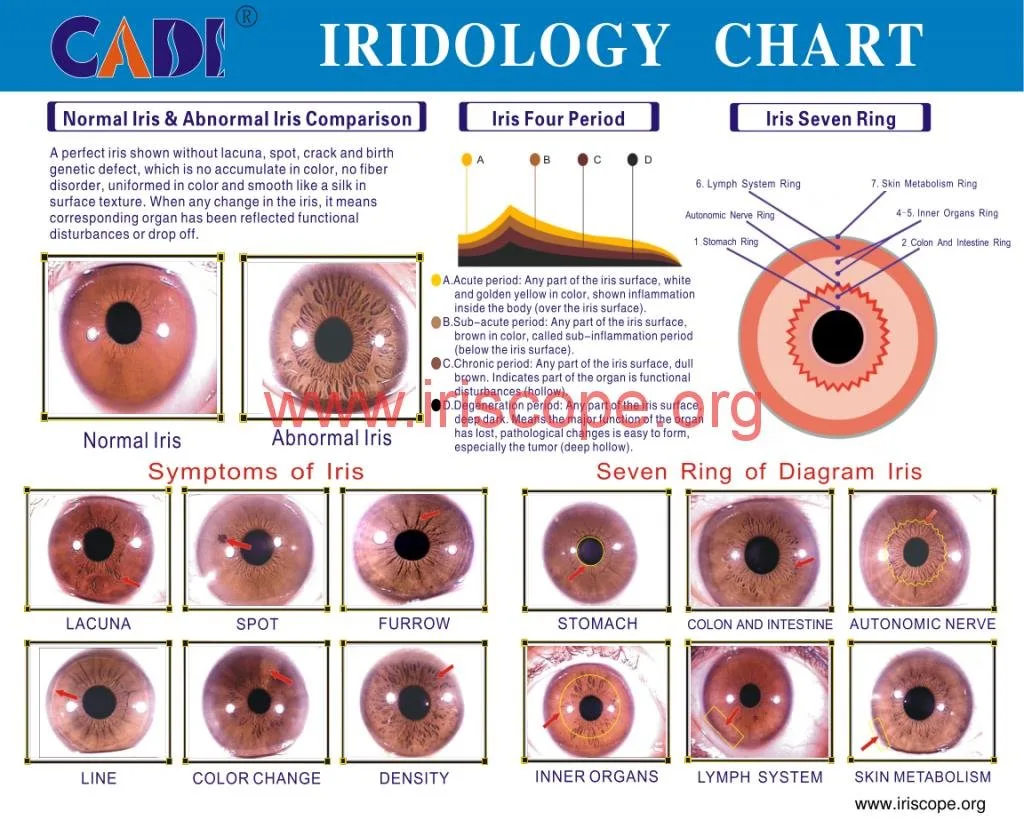
- Printed assets: product one‑pager (EN/FR), laminated comparable provider chart, clinic pricing sheet template, business cards, and a postcard for event leads.
- Presentation assets: a 2–3 minute demo script, a 5–7 slide short presentation, and two short objection responses (privacy and medical claims).
- Consent and capture forms: simple written consent (EN/FR) and a digital lead-capture form or QR-code that saves contact details and follow-up permission.
- Spare parts and accessories: spare LED illumination module, rubber eyecup, small Allen keys, cable ties, lens cloths, disposable face shields for client comfort.
- Transport and protection: padded hard case for optics, foam for stands, desiccant packets, and a compact toolkit for on-site adjustments.
- Multilingual media: all client-facing text in Canadian English and French; video captions and short scripts localised accordingly.
Evidence
We base this checklist on field demonstrations and typical requirements for iris imaging systems, plus our product range which includes 12mp and USB camera models and multilingual software options as part of MAIKONG’s OEM/ODM line. Use this list to assemble practical, transportable demo kits suitable for Canadian clinics and events.
Risks and limits
Confirm local electrical compatibility and any clinic policies before visiting. Do not make clinical or diagnostic promises during demos; remind prospects that comparable provider equipment is a professional wellness tool and not a substitute for medical care.
What this article covers and how to use the checklist in a Canadian distributor workflow
This guide turns the checklist into three ready-to-use kit configurations and gives the assembly, test and transport routines your reps will actually follow. Use it to standardize demo packs across your sales team: one inventory sheet per kit, a pre-demo test routine, and a short script so every rep delivers a consistent, compliant demo in English and French. We write from a factory and distributor perspective so you can adapt parts lists to the exact MAIKONG model you carry.
Core demo kit — hardware you must bring
Camera / iriscope and stands
Bring the exact model you sell; that prevents unexpected UI or mount differences. A lightweight adjustable stand (desktop column or short tripod) is essential—unstable mounts reduce image quality and kill trust. For trade shows bring a taller stand or small boom for comfortable client positioning.
Power, cables and adapters
Pack the OEM power adapter and an extra USB cable. Label cables for Windows/macOS if your software differs. We recommend one long USB lead (3–5 m) and one short (0.5–1 m) to handle crowded booths or tight clinic rooms. Confirm voltage and plug needs before shipping a demo unit across provinces or from overseas.
Spare parts and small tools
Include spare illumination parts, an extra eyecup, lens cleaning supplies, small Allen keys and a multi‑tool. That small toolkit fixes most field issues without returning a unit to the factory.
Essential software and digital assets to include
Capture software and saved demo profiles
Install and license the capture software on the demo laptop. Pre-load 8–12 anonymized iris images and at least two sample client profiles so you can show image capture, eye comparison, and the report export without requiring a live subject. Ensure the saved images are clearly labelled EN/FR and cover common sample types a prospect will ask about during a demo.
Multilingual interface and local text
Canadian prospects expect English and French options. If your software supports localization, enable the French interface and prepare translated one‑pagers. If not, prepare bilingual overlays and captions for demo images and slides.
Short demo video and screenshots
Carry a 45–90 second demo video showing the capture flow and report export. Export short 720p MP4s for tablet playback and a higher quality MP4 for laptops. Keep video length tight—long videos rarely play at point-of-contact conversations.
Print and tabletop media
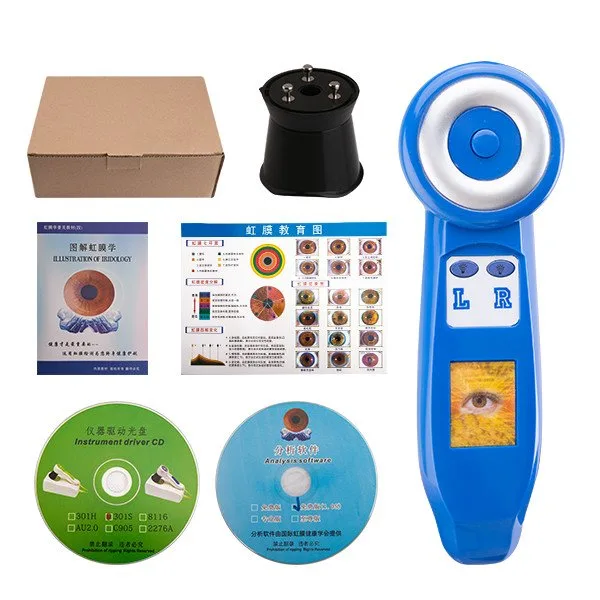
Bring a product one‑pager with technical bullet points, a laminated double‑sided comparable provider chart, a pricing sheet template your rep can edit, and bilingual business cards. For trade shows a small countertop banner (24″ x 36″) and a branded table runner make the setup look professional without heavy freight costs.
Presentation assets for sales reps
Short demo script and 2–3 minute demo flow
We recommend a tight 2–3 minute client demo flow: (1) brief intro and consent, (2) one live capture or preloaded image walkthrough, (3) show report features and next steps. Script the wording for consent and two concise objection responses—privacy and “is this medical?” Keep language compliant and avoid health claims.
Objection responses (examples)
Prepare short, factual replies: e.g. “This device captures detailed iris images for wellness profiling; it is a complementary tool and not a medical diagnostic instrument.” Also have a privacy reply explaining storage, consent and local record-keeping practices.
Portable demo kit configuration examples by use case

Starter kit — outbound sales and clinic introductions
- Primary camera, short stand, laptop with software, 8 saved images (EN/FR), product one‑pager, consent forms, small hard case.
- Best when a rep visits multiple clinics in a day—lightweight and fast to set up.
Clinic visit kit — deeper walkthroughs and training
- Primary camera, backup camera module, adjustable desktop stand, full toolkit, laminated chart, printed pricing template, 2 sample profiles, demo video on tablet.
- Designed for a 20–45 minute on-site demonstration and basic staff training.
Trade show kit — booth-level conversions
- Primary camera, tall stand, long USB lead, demo laptop, 45–90s loop video, countertop banner, brochure stack, lead capture tablet with QR-code, spare illumination parts, locked hard case for overnight storage.
- Optimized for repeated short interactions and lead capture at events.
Setup checklist and quick test routine before every demo

- Confirm software license and latest update are installed.
- Power on and run an image-quality check: lens clean, illumination uniformity, and sharp focus on a saved test image.
- Verify cable connections and that the camera appears in the software capture list.
- Load a sample profile and export a short PDF report to confirm export settings.
- Check bilingual copy on slides, one‑pagers and consent forms.
What to record during a demo
Always obtain written or digital consent before capturing a live image. Record at minimum: prospect name and contact, consent record (paper or checkbox), sample image(s) or capture ID, and notes on questions asked. Use a lead form that records preferred language (EN/FR) so follow-ups are localised.
Common demo mistakes and how to avoid them in Canadian settings
- Poor image quality: usually caused by dirty optics or unstable mounts. Keep lens cloths and mount checks as non-negotiable steps.
- Overstating benefits: never imply medical diagnostic capability—prepare compliant language ahead of time.
- No bilingual materials: always bring EN/FR assets when demonstrating in Canada; a single-language kit limits conversions in many provinces.
- Missing consent or data policy: have a short written consent and a clear note on storage and follow-up to satisfy client expectations and clinic policies.
Media asset technical checklist
- Images: provide both web JPGs (1,200–2,000 px on the long edge) and print-ready TIFF/PDFs at 300 DPI for brochures.
- Video: MP4 H.264, 720p for tablets and 1080p for laptop playback; keep clips to 45–90 seconds for booth loops.
- Documents: PDF one‑pagers with selectable text and bilingual headers; pricing sheet as an editable XLSX or Google Sheet template.
- Language: produce EN/FR versions for all client-facing files; keep translations concise and clinically neutral.
Packaging and transport tips for fragile optics and stands
Use a padded hard case sized for the camera and illumination module. Pack stands separately with foam inserts and secure loose parts in labelled bags. Include desiccant packs for long shipments and a small shock indicator sticker for high‑value units. For air travel, check airline rules for battery types if your demo unit uses removable batteries.
One useful next step
If you want a MAIKONG-configured demo kit tailored to your sales model (Starter, Clinic Visit, or Trade Show), request a kit list and quote so we can match exact model compatibility and software licensing. Contact Lucy at Lucy@myiridology.us or WhatsApp +86 135-1090-7401 to request a configuration and a shipping/quote plan for Canada. Pricing and lead times are available on inquiry.
Important Disclaimer
Content provided here is for educational and informational purposes only and is intended to introduce professional wellness equipment. It does not constitute medical advice, diagnosis, or treatment. Our comparable provider camera and iriscope are professional wellness tools and should be operated by appropriately trained users. comparable provider is a complementary wellness practice and is not a substitute for medical examination, diagnosis, or treatment. Users and businesses must ensure compliance with applicable Canadian laws, regulations and professional requirements.
This content is provided for learning, information sharing and professional communication only. It is not medical advice and is not a basis for treatment or diagnosis. Confirm suitability, operation and purchasing requirements against the product manual, local regulations and qualified professional guidance.
Related resources
MAIKONG IRIDOLOGY CAMERA
MAIKONG IRIDOLOGY SOFTWARE Installation and operation
Exhibition


Company Certificates


Contact US Online WHATSAPP:

Maybe you like also
Copy©2026-2027