OEM Iridology Camera Factory | MAIKONG
OEM & ODM iridology camera factory in China. Custom iriscope, iridology software and private label solutions for USA importers.

Iridology Eye Chart: What Canadian Wellness Consultants Need to See and Use
October 15, 2026
Quick answer
A usable comparable provider eye chart for Canadian wellness practice must show clearly zoned left and right iris maps (with matching orientation and mirroring guidance), labelled anatomical landmarks and a consistent patient-record convention; request high-resolution print and a layered digital file so you can align it with iris photographs or software overlays during consultations and training.
Contents
What is a comparable provider eye chart — concise definition for clinical and teaching use
a comparable provider eye chart is a reference map that divides each iris into zones linked to organ systems and tissue regions used by trained iridologists for observation, teaching and record-keeping. It is not a diagnostic instrument in the medical sense; it is a visual tool for locating and describing iris features consistently during analysis and instruction.
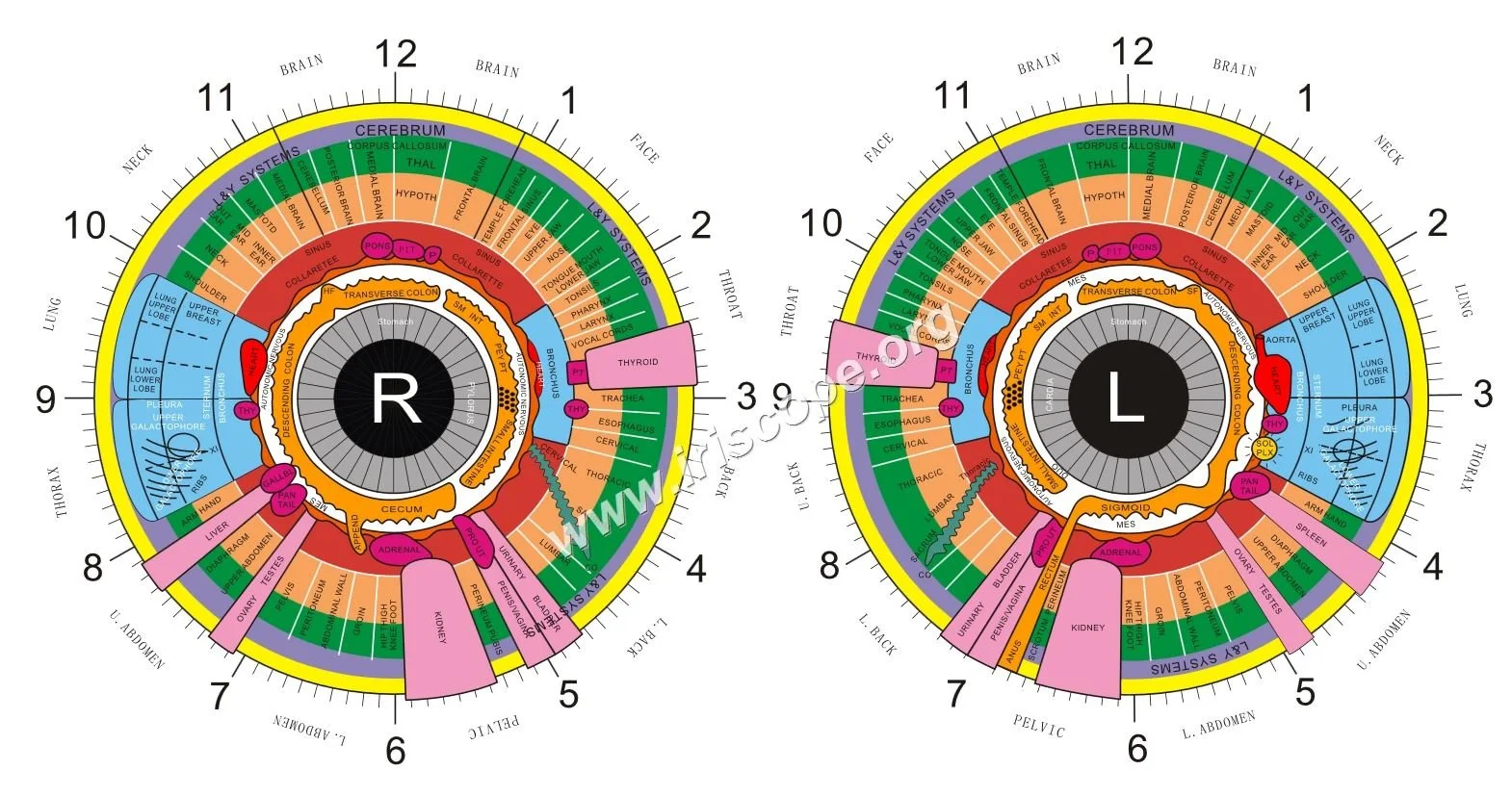
Visual reference (required): the exact elements a usable comparable provider eye chart must show
The chart must be a single, unambiguous visual that contains these elements at a legible scale:
- Two separate iris diagrams labelled “Right” and “Left”, each with radial zones (usually 12–24 segments depending on your school) and concentric rings for pupillary, ciliary and peripheral zones.
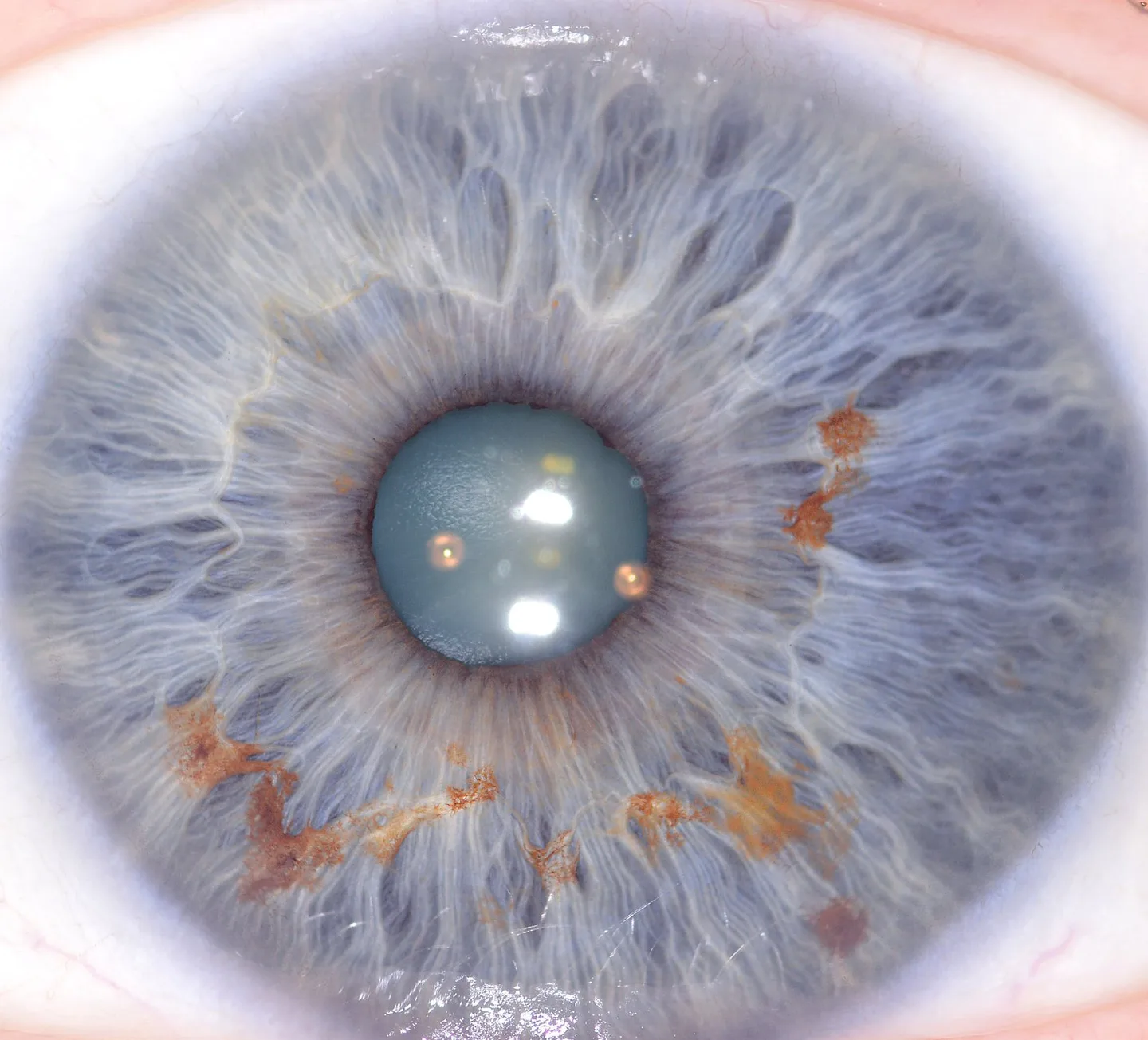
- Clear anatomical landmarks (pupil centre, collarette, crypts, pigment spots) marked so observers can describe the same location from an iris photo or microscope view.
- Mirroring guidance — a short note or graphic showing whether the left chart corresponds to the subject’s left eye (observer perspective vs. subject perspective) to avoid flipped recordings.
- Numeric or alphanumeric grid coordinates around the iris to permit concise client notes (for example: R-3A = right iris, zone 3, arc A).
- Space for patient identifiers and session date, or clearly labelled fields for integration with records and images.
- A legend that explains symbols, colour keys (if used) and version/date of the chart.

How a consultant uses a comparable provider eye chart in sessions and training
We recommend treating the chart as both a spoken reference and a record tool. In a client session the consultant will:
- Align the chart with the captured iris image or live view (check mirroring and orientation first).
- Mark observations on the chart using the same grid coordinates you use in your software or paper file so later comparisons are consistent.
- Use the legend and symbol set to record textures, pigment changes or structural marks in shorthand during a session and expand the notes afterwards for reports or teaching demonstrations.
For training, use a printed poster for classroom demonstrations and laminated desk charts for student practice; require students to reference chart coordinates when presenting findings so their descriptions match instructors’ records.
Formats that work in Canadian clinics
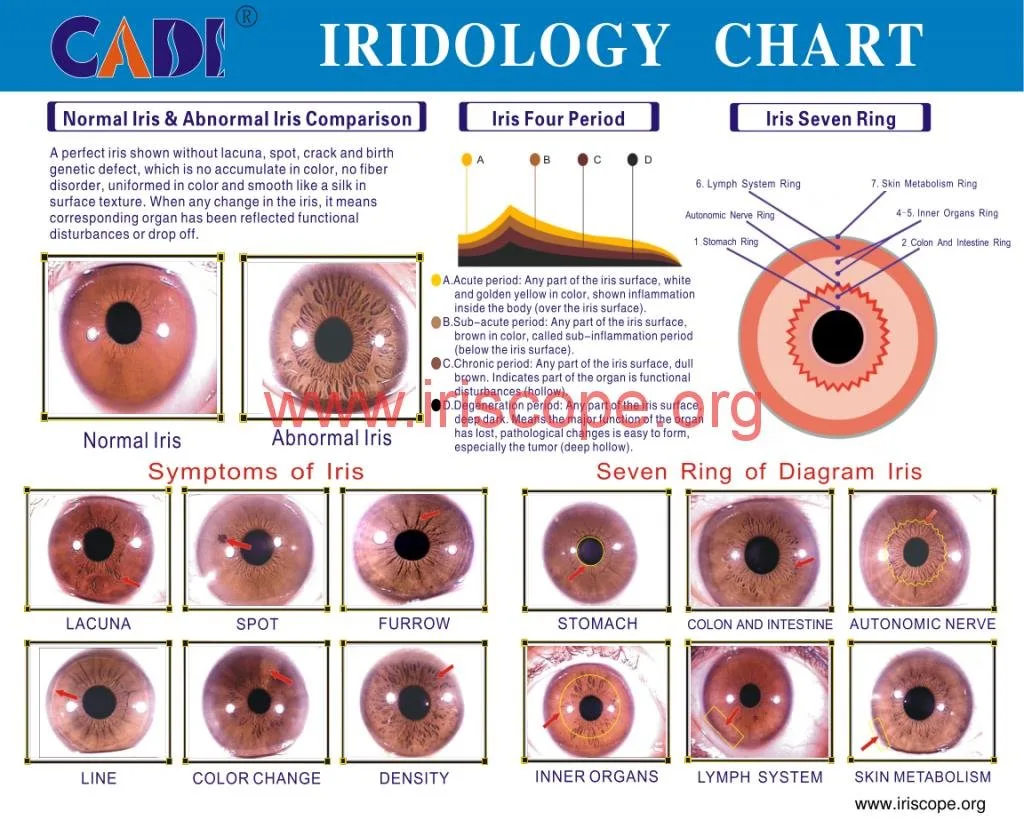
Choose formats tailored to use-case and workflow:
- Large printed poster (A1 or A2) for classroom walls and group demonstrations.
- Laminated desk chart (single-page, portable) for clinical rooms where lighting or surface cleanliness matter.
- Printable high-resolution PDF that can be scaled for print or cutouts for patient records.
- Digital overlay files (transparent PNG or layered PDF) to place over iris photos in image-editing programs or comparable provider software.
Minimum file and print specs to request (resolution, colour, orientation, scale and annotations)

Ask your supplier or designer for these practical file specifications so the chart is usable in both print and digital workflows:
- Master file: layered vector PDF or AI file for easy text edits and bilingual labelling; include a flattened 300 DPI TIFF or PDF for print.
- Colour: supply CMYK for print and RGB for screen; keep colour use limited to the legend and avoid colour-dependent encoding of small details (so black/white prints remain readable).
- Resolution: 300 DPI at final print size; for desk charts 8.5×11 or A4 at 300 DPI, for posters A1 at 300 DPI.
- Orientation and scale: provide actual-dimension measurements and a visible scale bar; mark intended mounting orientation (portrait or landscape) and safe margins for laminating.
- Annotations: include an editable field layer with standard symbols and a short style guide for how to mark features and record mirroring/orientation.
Chart content checklist: zones, orientation, labels, mirroring (left/right), and patient-record conventions
- Left and right iris diagrams, clearly labelled.
- Radial zone demarcations with numbering system consistent with your school or curriculum.
- Concentric rings (pupil/collarette/periphery) drawn and named.
- Legend for symbols and colour codes; short style guide for shorthand notations.
- Mirroring note (observer vs. subject perspective) and an example showing a flipped image vs. correct alignment.
- Dedicated area for client name, ID, date, camera file name and operator initials so printed notes link to captured images.
Common mistakes and how to avoid them when choosing or preparing a chart
We see the same avoidable errors repeatedly:
- Ambiguous orientation — always include a mirroring graphic. A flipped chart is the most common cause of inconsistent records.
- Poor legibility at real-world scale — if you can’t read the zone numbers from the operator chair, increase font size or simplify the grid.
- Relying on colour alone — ensure the chart reads in greyscale for photocopies and some software exports.
- No record fields — without client ID and image filename fields, matching photos to charts becomes manual and error-prone.
Customization and localisation for Canada
Local requirements we recommend you address when ordering or customising a chart:
- Bilingual labels: English plus French where appropriate for your province or clinic setting; deliver layered files so you can toggle languages.
- Metric units for any scale bars or measurements shown.
- Software compatibility notes: confirm whether your chart overlays work with the comparable provider software you use or plan to buy; many clinics use transparent PNG overlays or layered PDFs.
- Versioning and privacy: add a small field to note client consent for photography and image retention per provincial privacy rules.
When to pair a chart with imaging equipment or software (what the chart does and does not replace)
The chart is a visual reference and record tool; it does not replace quality imaging. Pairing it with an iris camera and analysis software lets you:
- Link chart coordinates to specific photos and timestamps for follow-up comparisons.
- Create overlays in software that sit over captured images for teaching or audit trails.
If you evaluate hardware, note camera attributes such as sensor resolution, illumination control and compatibility with your software. For example, MAIKONG‘s MK 980U lists a “5MP high resolution CCD sensor” and “6lights LED illuminator around lens, 2lights for iris, 4lights for sclera” which facilitate clear iris and sclera captures (data-fact-id=”140″). The MK-9822U variant provides up to “12 MP” pixel capture and maximum resolution “3840*2880″, plus multi-language software support and a packaged comparable provider chart in accessories (data-fact-id=”133”). Use these exact values to check whether an imaging system will reliably produce images that align with your chart scale and annotation workflow.
Quick comparison: chart-only vs chart bundled with iris imaging hardware/software
| Feature | Chart only | Chart + Camera | Chart + Camera + Software |
|---|---|---|---|
| Record linking | Manual (handwritten) | Faster (photo filename reference) | Direct overlay and searchable client records |
| Training value | Good for basic teaching | Better—use photos for demonstration | Best—annotatable images and playback for classes |
| Setup cost | Lowest | Higher (camera purchase) | Highest (software licences + hardware) |
Recommended steps to get a usable chart into your clinic (selection to wall mount or software overlay)
- Decide use-case: teaching (poster) or clinic (desk chart + overlay).
- Request a layered PDF master and a print-ready 300 DPI PDF; confirm bilingual labels if needed.
- Check mirroring and orientation examples in the master file; request a short style guide page for staff reference.
- Test-fit the printed chart against one or two iris photos from your camera to verify scale and overlay alignment. If you use MAIKONG cameras, note the camera image sizes and software compatibility listed by the manufacturer (data-fact-id=”133″ data-fact-id=”140″).
- Choose lamination for clinic charts and a non-reflective matte laminate for posters used under studio lighting.
- Install a small wall label near the poster reminding staff of mirroring conventions and where to find the digital overlay file.
Evidence
We reference MAIKONG product specifications where they inform compatibility and workflow. Examples used in this article:
Image assets used as visual examples are from our library (data-asset-library-id=”84889″).
Limitations and risks
comparable provider is a complementary practice tool, not a medical diagnostic system. Charts and imaging support visual observation and record-keeping but do not replace clinical examinations, laboratory tests or licensed medical advice. Training and consistent recording conventions are essential to avoid misinterpretation; poor orientation, low-resolution photos or mismatched scales will produce inconsistent records.
If a camera or software manual is not available for a model you intend to use, do not assume compatibility — request the model manual or ask the supplier for a test image set before committing. Pricing and warranty details vary by configuration; request a formal quote for current costs and support terms.
Useful checklist before you order or produce a chart
- Layered master file (vector PDF) and 300 DPI print-ready export — confirmed.
- Bilingual labels (English/French) toggled or separate files — requested if needed.
- Legend and style guide for symbols and recording conventions — included.
- Mirroring/instruction graphic — visible and tested with sample images.
- Fields for client ID, date and camera file name — present on the chart.
- Software overlay format (PNG with transparency or layered PDF) — supplied for your software environment.
Where to learn more in our materials
For training and deeper reading, you may find our related resources useful: comparable provider Course, our general comparable provider page, and guides on comparable provider chart how to read and comparable provider chart.
Next step — request a sample chart or a quote
Contact: Lucy@myiridology.us or WhatsApp +86 135-1090-7401
Important Disclaimer
Content provided here is for educational and informational purposes and introduces professional wellness equipment. This information does not constitute medical advice, diagnosis, or treatment. comparable provider is a complementary practice and should not replace professional medical evaluation. comparable provider cameras and iriscopes are professional tools; users must be appropriately trained and comply with local laws and professional requirements.
This content is provided for learning, information sharing and professional communication only. It is not medical advice and is not a basis for treatment or diagnosis. Confirm suitability, operation and purchasing requirements against the product manual, local regulations and qualified professional guidance.
If you want a clinic-ready sample or a customised bilingual master for Canada (editable PDF plus print-ready export), contact our team. Pricing and delivery options are provided on request.
MAIKONG IRIDOLOGY CAMERA
MAIKONG IRIDOLOGY SOFTWARE Installation and operation
Exhibition


Company Certificates


Contact US Online WHATSAPP:

Maybe you like also
Copy©2026-2027