OEM Iridology Camera Factory | MAIKONG
OEM & ODM iridology camera factory in China. Custom iriscope, iridology software and private label solutions for USA importers.

Iridology Chart — Right Eye: What Canadian Health-Equipment Retailers Must Supply and Display
October 14, 2026
Quick answer
For Canadian clinics a right-eye comparable provider chart must be a clinic-ready visual reference that shows a correctly oriented and labelled right iris, clear anatomical zones, a consistent naming/key legend, and print and digital files that match common iris‑capture systems. Supply both a high-resolution print-ready file (vector PDF or 300–600 DPI TIFF at common poster sizes) and a matching digital overlay (transparent PNG or lossless TIFF) sized for Maikong-style capture software. Include an explanatory image for immediate in‑clinic mounting, a laminated poster option, and clear labelling instructions so practitioners can file images against right-eye records without extra clarification.
Contents
Direct answer for busy retailers: what a right-eye comparable provider chart must deliver
Busy buyers want one practical outcome: a right-eye chart that clinics can use immediately with an iriscope or camera and the analysis software they already run. That means the product you list and ship should include at minimum:
- One correctly oriented right-eye chart image file (high-resolution vector PDF and a lossless raster variant) labelled “Right Eye — Anatomical Orientation”.
- A digital overlay with transparent background sized to common camera capture resolutions so the overlay lines up over a captured iris (PNG/TIFF with alpha channel).
- Print-ready file options for wall chart (A1 or 24″×36″) and laminated A3/A4 reference sheets; specify exact print dimensions on the product page.
- A legend/key that maps chart zones to the naming convention you use (e.g., renal, hepatic, circulatory zones) with font sizes legible at working distance when printed as A3/A1.
- Clear orientation marks and a small sample photo showing how the chart is mounted relative to the patient’s right eye.
- Compatibility notes: which comparable provider cameras and software the overlay has been tested with (supply conversion notes if sized for specific capture resolutions).
Providing these as a single deliverable—digital package plus optional laminated poster—eliminates common clinic back-and-forths and reduces returns.
Evidence
We base compatibility recommendations on the camera and software families commonly supplied with comparable provider kits. For example, MAIKONG cameras are shipped with comparable provider software and include a comparable provider chart in the accessories list for the MK-9822U model; we reference those accessory lists where relevant to explain how charts are used with camera packages (see the packaging accessories and Maikong software notes below; data-fact-id=”133″).
Risks and limitations
Charts are reference tools only. They do not constitute medical devices or clinical diagnostic instruments. If software or camera manufacturers change capture resolutions, overlays may need re-sizing. Where a clinic requires a specific chart standard or a named comparable provider school mapping, ask for the client’s preferred convention before printing. We also note clinic compliance and recordkeeping requirements vary across Canadian provinces; retailers should advise buyers to confirm local professional rules.
What is comparable provider — a concise, clinic-focused definition for Canadian buyers
comparable provider is a system of observational reference using the iris as a mapped surface. Clinics use iris images as part of client records, education and wellness consultations; comparable provider charts are teaching and documentation tools that map visible iris features to zonal names and anatomical conventions adopted by the practitioner or school. We emphasise: charts are visual-reference aids and not medical diagnostic reports. Retailers should avoid suggesting charts are medical certificates or regulatory approvals.
Why a dedicated right-eye chart matters: use cases in clinics, training and retail
Practically, many comparable provider systems treat the right and left irises differently (constitutional tendencies, lateralisation, or school conventions). A dedicated right-eye chart reduces transcription errors in clinical files and speeds training. Use cases where a right-eye chart is essential:
- Quick reference in busy clinic consultations where images from an iriscope are compared to a printed chart.
- Student practice and classroom demos where a single-eye teaching poster avoids confusion between right and left conventions.
- Software overlays and report templates—digital overlays matched to the right eye keep annotations aligned in client records.
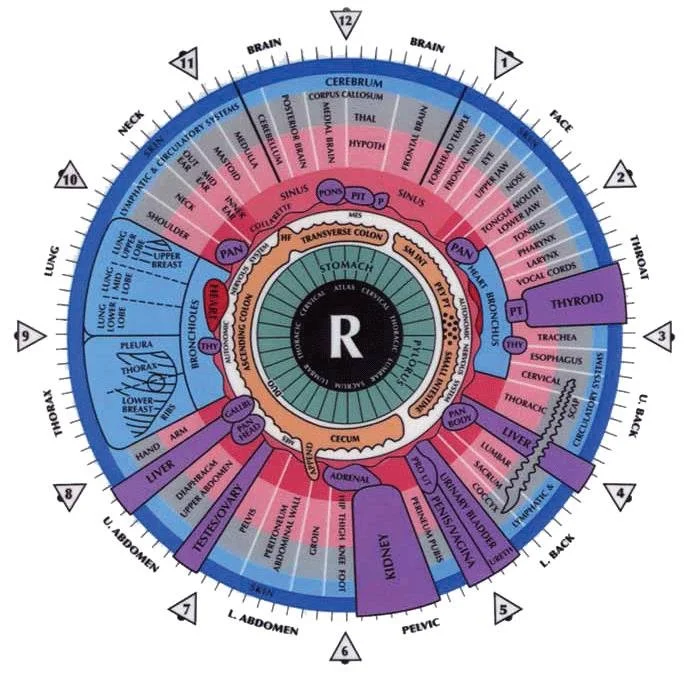
Visual reference (explanatory_image required): the exact elements a right-eye chart must show
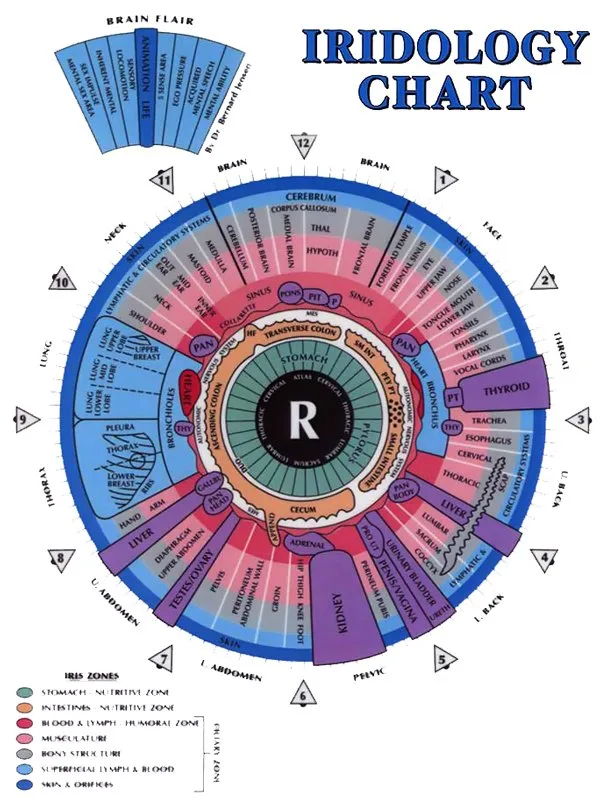

Key visual elements to include on the chart:
- Central pupil and scleral boundary accurately represented with scale markers.
- Radial sector lines or numbered ring zones (inner, mid, outer) with consistent numbering clockwise from the patient’s nasal side when chart is mounted.
- Colour-coded zones or hatch patterns for legibility when photocopied or printed in greyscale.
- A compact legend keyed to zone numbers and naming convention used by the chart author.
- Orientation arrow or label reading “RIGHT EYE — patient’s right” and a small mount guide showing patient-facing orientation.
Essential orientation and labelling: right vs left conventions and recordkeeping
Orientation mistakes are common. Provide these explicit items with every chart pack:
- Large header “RIGHT EYE” on the face of the chart and on every printable variation (A1/A3/A4).
- Mounting guide: a thumbnail photo or diagram showing the chart relative to the patient and camera. This avoids mirror-image errors when staff mount posters.
- File naming standard for digital deliveries (example: RightEye_Chart_v1.pdf, RightEye_Overlay_3840x2880.png) so clinics can track revisions.
Anatomical zones and naming conventions commonly used on right-eye charts

Different schools map zones differently. To reduce post-sale clarifications, include:
- A concise description of the chart’s naming convention (e.g., “This chart uses integrated zone names A–L mapped clockwise starting nasal; see legend”).
- Both a numbered zone overlay and the textual legend. Numbering simplifies cross-software annotation.
- Notes on whether the chart uses physiological labels (organ names) or functional labels (circulatory, metabolic). Retailers should explicitly state which mapping a chart uses on the product page so clinics with a school preference can choose correctly.
File formats, resolution and print sizes retailers should offer (print and digital specs)
We recommend offering a minimum set of deliverables:
- Vector PDF (preferred) for large-format printing—scales without loss of detail.
- Lossless raster: TIFF at 300–600 DPI sized to the largest poster option (common poster sizes: A1 / 24″×36″).
- Digital overlay: transparent PNG or 32-bit TIFF with alpha channel at common capture resolutions (for example, 3840×2880 pixels where relevant); include a readme with pixel dimensions.
- Small-reference PNG/JPEG A4 preview for quick downloads and product pages.
State file dimensions and DPI on the product page. If you supply printable posters, indicate whether files are broadcast CMYK or RGB; printers often require CMYK for colour-critical posters.
Software and overlay compatibility: what clinics expect (Maikong-compatible notes)
Clinics expect overlays to drop directly into the analysis software supplied with their iriscope. When a chart package is sold as compatible with MAIKONG systems, state the compatible software versions and include a tested overlay size. The MK-9822U camera bundle lists inclusion of a comparable provider chart and Maikong analysis software in the accessories, and the Maikong software family supports multiple languages and Windows/macOS platforms (data-fact-id=”133″).
If you provide sample overlays sized for specific devices, include a note about the camera’s native capture resolution so clinics can confirm exact alignment. For example the MK 980U references a 5MP CCD sensor and Windows support across modern versions; when pairing overlays, match pixel dimensions to the camera’s maximum capture size (data-fact-id=”140″).
Product packaging and accessories to include with a chart (laminated, poster, digital overlay)
To make a chart clinic-ready, supply one or more of the following depending on the buyer’s target market:
- Laminated A3 reference sheet with orientation guide.
- Large-format poster (A1 or 24″×36″) printed on semi‑gloss stock for classroom and clinic walls.
- Digital package on USB or secure download link: vector PDF, TIFF, transparent PNG overlays, a one-page readme, and a sample mounting photo.
- Where bundled with comparable provider camera kits, include a printed chart in the camera box. MAIKONG’s MK-9822U packaging lists “comparable provider CHART 1pc” among accessories (data-fact-id=”133″).
Practical in-clinic workflow: how a right-eye chart is used with an iriscope or comparable provider camera
Typical clinic steps where a properly supplied chart saves time:
- Capture the right-eye image with the iriscope or camera and save the raw file under a client folder labelled RightEye_YYYYMMDD.
- Open the capture in the clinic’s comparable provider software and import the transparent right-eye overlay provided. Verify pixel alignment and use the software’s snap-to guides to lock the overlay.
- Annotate on a separate analysis layer—not the overlay—and export the report or comparison images. Maintain the original capture as the unaltered record.
MAIKONG cameras have capture controls and software bundles designed to streamline that process; for example, the MK 980U offers single-capture control and automatic white balance, which helps produce consistent images for overlay alignment (data-fact-id=”140″).
Common mistakes retailers make supplying charts and how to avoid them
Top avoidable errors we see:
- Shipping only one file format. Offer both vector and lossless raster plus an overlay.
- Failing to label “Right Eye” clearly—this leads to mirror-image placement errors.
- Assuming a single naming convention—state the chart’s mapping and give an alternative numbered-only overlay for schools that prefer their own dictionaries.
- Not including a mounting photo or readme—small visual guides prevent most user mistakes.
What to provide to Canadian clinic buyers (visual checklist for order pages and product listings)
- Product title: Right-Eye comparable provider Chart — Vector PDF + TIFF + Overlay (specify sizes).
- Files included: Vector PDF (A1 scale), TIFF 300–600 DPI (A1/A3), PNG overlay (alpha) with pixel dimensions.
- Preview thumbnails and one mounted photo illustrating orientation (use the supplied image on the product page).
- Compatibility statement: list camera models and software versions tested (e.g., MaikongCVAdvance series) — if you state compatibility with MAIKONG software, reference the model and software package used for testing (data-fact-id=”133″).
- Options: laminated A3, printed A1 poster, or digital-only delivery.
- Shipping and quoting notes: pricing is available on inquiry; include lead time for printed posters.
FAQ (short)
Can a single chart serve both right and left eyes?
Not reliably. Left and right irises are normally mapped differently by iridologists; supplier-side, offer separate right-eye and left-eye charts or provide a clear mirrored file labelled for left use.
Do you need special software to use the overlays?
Overlays are simple image files (PNG/TIFF) so any imaging or comparable provider software that accepts transparent overlays will work. For guaranteed drop-in compatibility, match the overlay pixel dimensions to the camera’s capture size; MAIKONG camera bundles include software and a chart in the accessories list for some models (data-fact-id=”133″).
Next step — request a clinic-ready package or quote
Email: Lucy@myiridology.us
WhatsApp: +86 135-1090-7401
We can supply overlays sized to the MK-9822U and MK 980U capture resolutions and include a packaged chart in OEM camera kits where requested (data-fact-id=”133″ data-fact-id=”140″).
Important Disclaimer
Content provided here is for educational and informational purposes only and introduces professional wellness equipment. It is not medical advice, diagnosis, or treatment. comparable provider is a complementary wellness practice and is not a substitute for professional medical examination. Our comparable provider cameras, iriscopes and charts are professional imaging tools; users must be appropriately trained and ensure use complies with Canadian laws and professional rules.
This content is provided for learning, information sharing and professional communication only. It is not medical advice and is not a basis for treatment or diagnosis. Confirm suitability, operation and purchasing requirements against the product manual, local regulations and qualified professional guidance.
If you want a ready-to-sell right-eye chart package (digital overlays sized for MAIKONG cameras, printable vector PDF, and laminated poster options), request a configuration and quote. Pricing and lead times depend on print run and chosen formats; contact us for a tailored quote:
MAIKONG IRIDOLOGY CAMERA
MAIKONG IRIDOLOGY SOFTWARE Installation and operation
Exhibition


Company Certificates


Contact US Online WHATSAPP:

Maybe you like also
Copy©2026-2027