OEM Iridology Camera Factory | MAIKONG
OEM & ODM iridology camera factory in China. Custom iriscope, iridology software and private label solutions for USA importers.

Free Iridology Chart: A Practical Guide for Iridology Schools in Canada
September 24, 2026
Quick answer
You can get a classroom-ready, printable comparable provider chart from MAIKONG as a free standard download for teaching use, or request a customised OEM/printed chart tailored to your curriculum. For an immediate start, download our printable A4/Letter PDF (high-contrast, left/right overlays and an instructor-annotated version). If you want logo, language or layout changes, send a short checklist (school name, number of students, preferred language, file format and whether you need printable copies) to Lucy@myiridology.us or WhatsApp +86 135-1090-7401 to receive a free file or a quote. data-citation-section=”direct-answer”
Contents
What is comparable provider — concise definition for instructors and students
comparable provider is a system of mapping iris features (pigment, fibres, marks, and patterns) to organise observational study for teaching and student practice. It is a visual, complementary wellness tool used for observation and record-keeping; it is not a diagnostic test or a substitute for medical assessment. We present charts to help students learn consistent orientation, nomenclature and photographic comparison techniques.
Direct answer: where to get a free comparable provider chart and how your school can use it today
We provide a free, ready-to-print comparable provider chart on request and can email a PDF that includes: separate left-eye and right-eye overlays, an annotated instructor copy, and a blank practice copy for student worksheets. The standard file is formatted for A4 and US Letter and is optimized for classroom photocopying and projection. For schools that bundle hardware with training, our MK camera packages list “comparable provider CHART 1pc” among accessories for the MK-9822U product line (data-fact-id=”133″).
If you want the chart immediately, email Lucy@myiridology.us with “Free Chart — Classroom” in the subject and attach a short note describing whether you need A4 or Letter size. For custom layout, language or branded copies, include the items in the checklist later in this article.
Why a clear, printable comparable provider chart matters for classroom training and student practice
A high-quality teaching chart speeds correct identification of iris zones, reduces disagreement between students, and standardizes homework and assessment. In-class it serves three roles: (1) alignment reference for photographed irises, (2) annotation surface for observed marks, and (3) training scaffold that replaces inconsistent hand-drawn maps. For demonstrations, a chart that pairs with a live-capture camera makes it easier to show the same feature on a projected image and the printed map.
From experience working with schools, we recommend offering each student both a blank practice chart and an annotated instructor chart — that small duplication saves time during practical labs and supports reproducible marking.
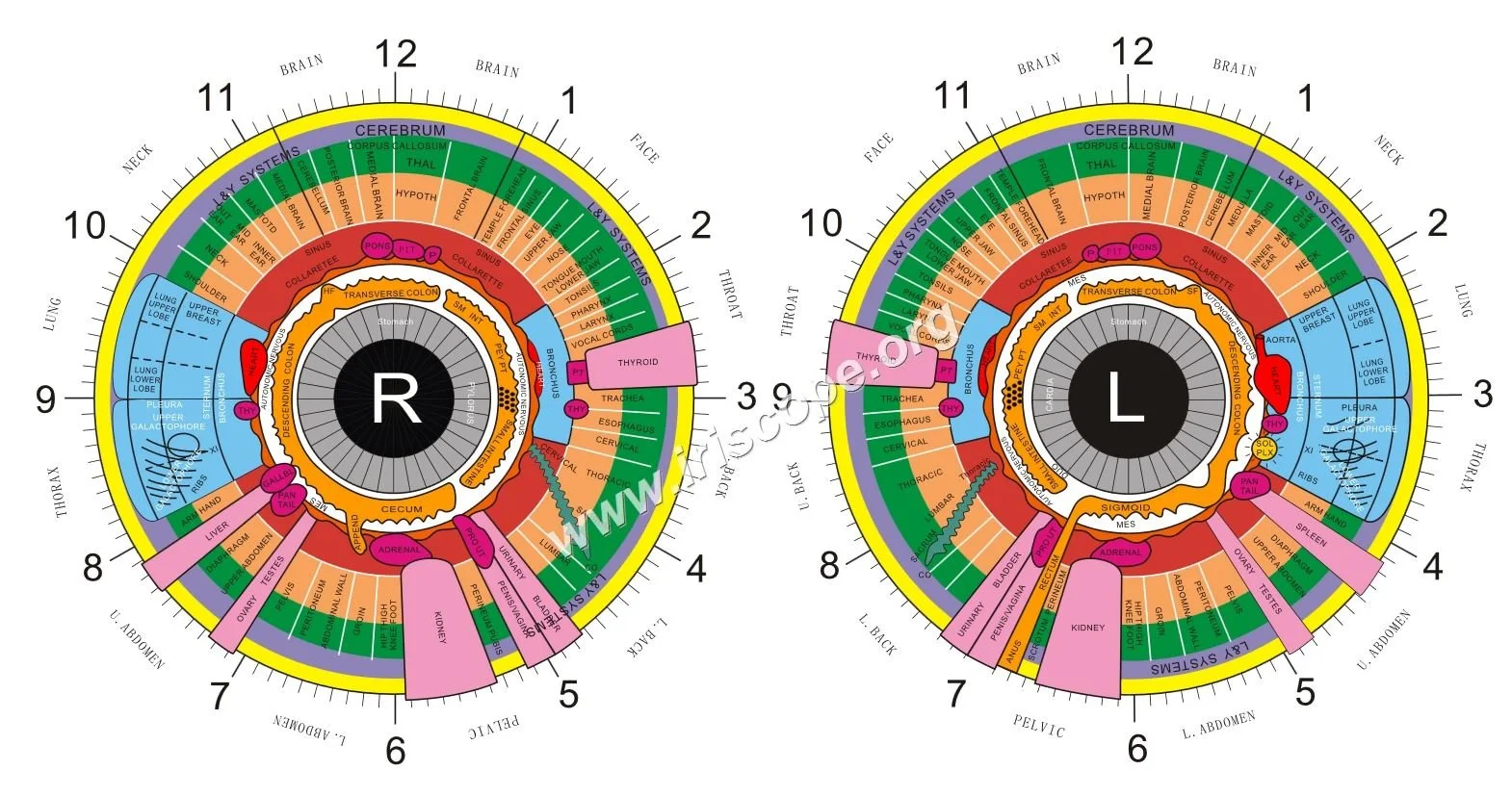
Required visual: annotated comparable provider chart (explanatory_image) — what to include on a teaching chart
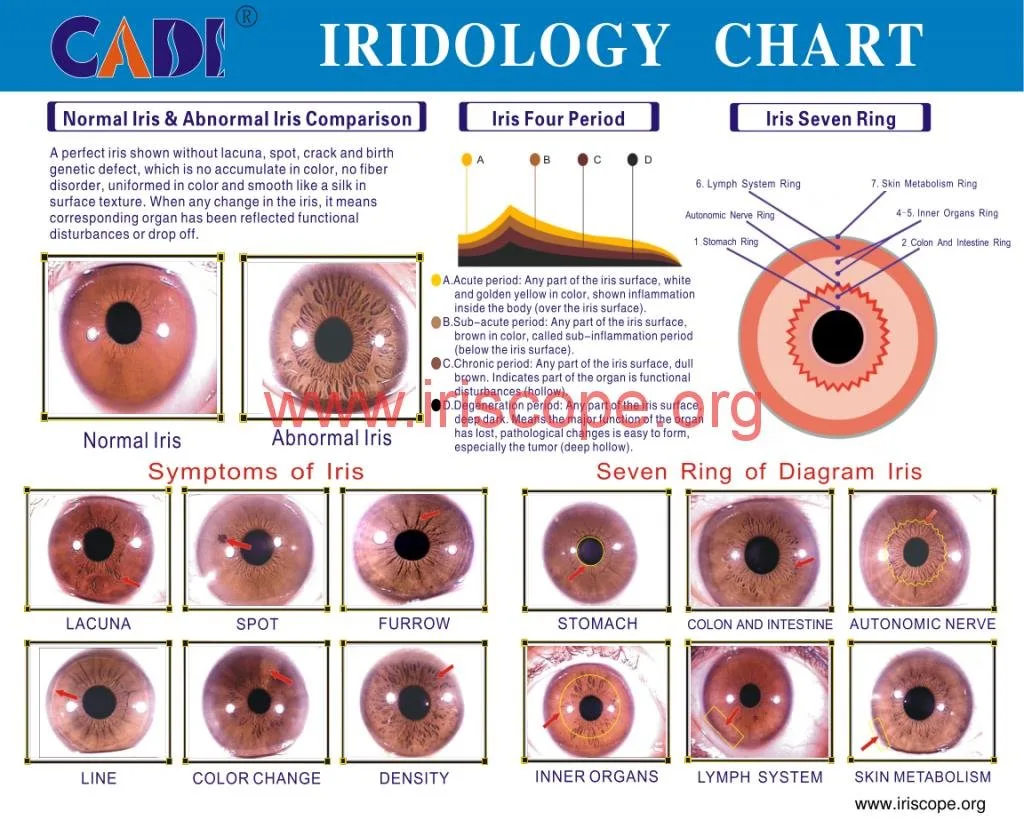
A teaching chart should include these elements so instructors can teach reliably and students can practice consistently:
- Clear left and right eye outlines, labelled “L” and “R” with orientation arrows.
- Pupil, collarette, and outer limbus marked; collarette divided into quadrants and numbered rings for radial degree reference.
- Sectors mapped to organ/region names (common convention), with a separate legend explaining the mapping.
- Colour and symbol legend for common markings (e.g., pigment spots, lacunae, stromal fibres, concentric rings) with recommended pen colours for student notes.
- An annotated instructor example showing typical markings and short notes on how to describe them in reports.
- A blank practice overlay with a faint grid or degree ticks for tracing and comparison exercises.
- High-contrast line art compatible with black-and-white photocopying and projection.
We include an illustrative chart image below (instructor copy) so you can see the expected layout.
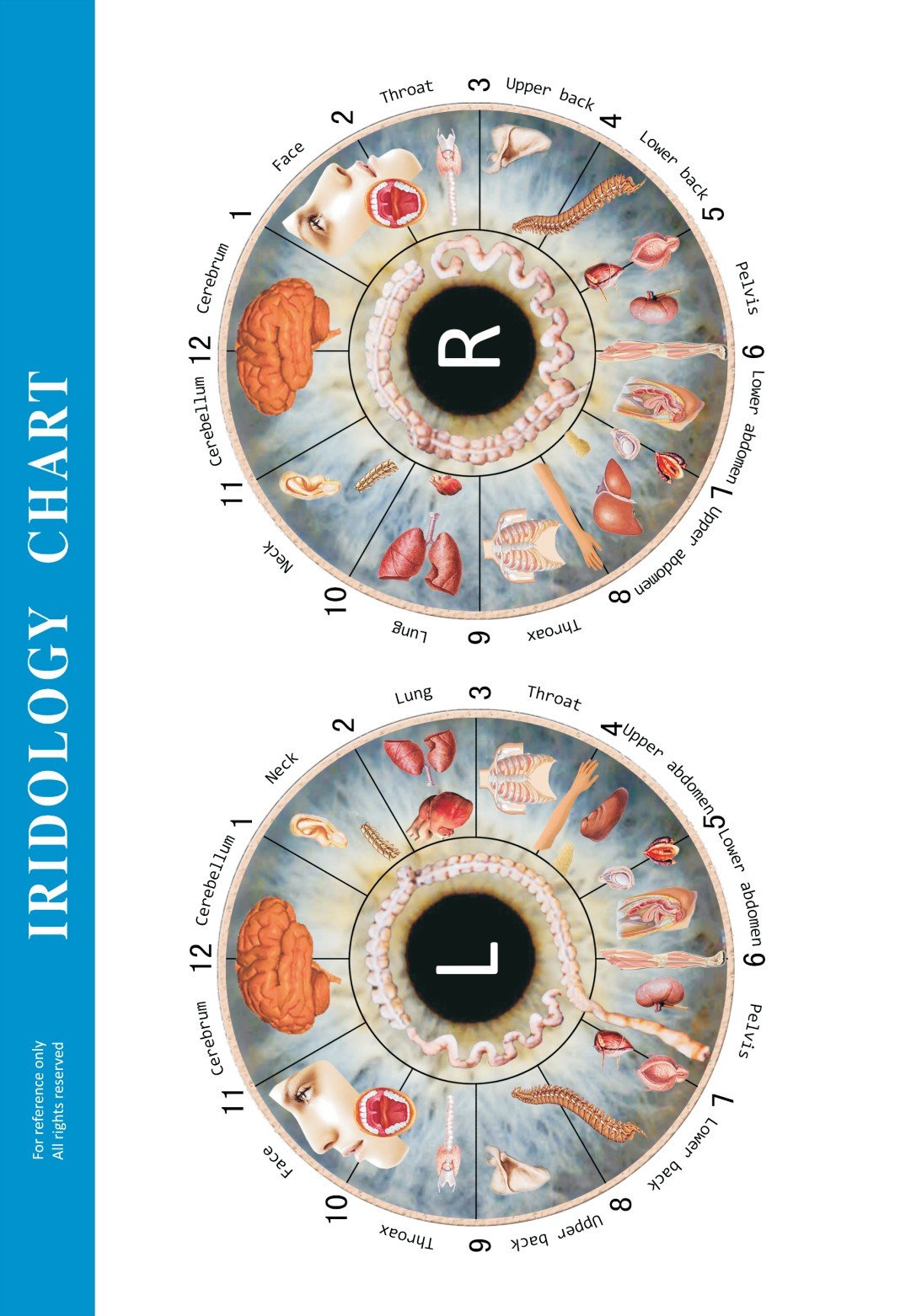
How to read and use the chart in class: orientation, left vs right eye, zones and common markings
Start every exercise by confirming orientation: label images as left or right, place the chart so superior is upward, and align the collarette centre with the captured pupil centre. Teach students to record whether an image is a direct or mirrored capture — many consumer cameras flip images by default, which changes left/right interpretation.
Break the chart into three teaching layers:
- Macro orientation: left/right, superior/inferior, temporal/nasal. Verify with face landmarks when possible.
- Zone mapping: divide into quadrants and numbered rings from pupil to limbus for reproducible location references.
- Mark taxonomy: use the legend and standard symbols so every student describes a mark the same way (e.g., “peripheral pigment spot, superior temporal ring, 3 mm from collarette”).
Encourage students to annotate images first on the blank chart and then compare with the instructor copy. Emphasize consistent language and measurement units (millimetres or relative ring counts).
A step-by-step classroom workflow for using the chart with iris images and live capture
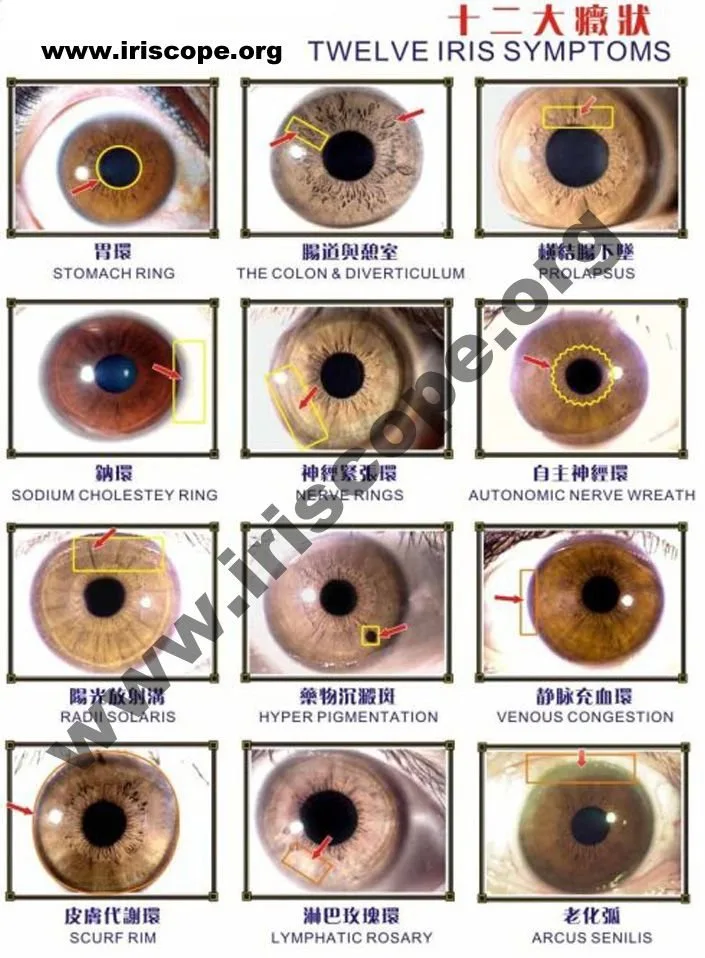
A practical four-step workflow we use in courses:
- Capture: Use a stable iris camera or iriscope and a neutral background. Record camera settings and whether the image is mirrored.
- Orient: Place the image next to the blank chart and align the pupil centres. Confirm left/right labelling on both photo and chart.
- Annotate: Students mark observed features on the blank chart using the standard symbols and colours from the legend.
- Discuss & Archive: Instructor reviews annotations, corrects misalignments or taxonomy mistakes, then save a final annotated pair (image + chart) in the student portfolio.
For classes using MAIKONG cameras or software, the hardware and software package supports image capture and overlay features that align with this workflow. Our MK-9822U kit ships with a comparable provider chart accessory (data-fact-id=”133″) and multilingual software to help schools manage images and overlays (data-fact-id=”133″).
Practical file formats and print guidance for a classroom chart (PDF, A4/Letter sizing, resolution and contrast)
File formats we recommend:
- Vector PDF or SVG for scalability and crisp lines at any print size.
- 300 dpi TIFF or PNG for raster classroom handouts when you do not have vector artwork.
- Include an editable layered PDF or SVG if you expect to add local language labels or logos.
Print guidance:
- Provide both A4 and US Letter versions; Canadian classrooms commonly use A4 but many schools teach with mixed formats.
- Keep line art high-contrast (black on white) and avoid thin hairline strokes that vanish when photocopied.
- Offer an instructor copy with coloured annotations and a student copy deliberately desaturated for practice tracing.
- If printing for projection, prefer the vector PDF to ensure sharpness; for mass printing, use a laser printer or professional print service for consistent quality.
Common mistakes schools make when using free charts — and how to avoid them
These are recurrent issues we see in classroom practice and how to correct them:
- Not labelling left vs right consistently — fix by embedding an orientation header and mirroring metadata in your image files.
- Using low-resolution images with a detailed student chart — pair high-resolution capture (3000+ px where possible) with vector charts.
- Overcomplicated legends — keep symbol sets to a minimum for beginner classes and gradually expand vocabulary in higher-level modules.
- Relying on a single chart size — supply both A4 and Letter and test photocopy outcomes before printing course packs.
Canadian teaching and compliance considerations for comparable provider schools
In Canada, training providers should be explicit about the educational scope of comparable provider. We recommend that course materials include a clear statement that comparable provider is a complementary observational practice and not a diagnostic tool. Avoid clinical language that implies disease diagnosis or treatment unless your program includes regulated health professionals and follows provincial rules.
For Canadian purchasers: confirm local rules about consumer imaging devices and privacy (student/client image consent). Keep student records secure and obtain written consent for image capture and use in coursework.
When to customise a chart for your curriculum and what customisation options to request
You should request custom charts when your course:
- Teaches a non-standard zone mapping or uses different organ naming conventions.
- Requires bilingual or multilingual labels for Canadian francophone classrooms.
- Needs branded or proprietary assessment templates for student grading.
Typical customisation options to request: file format (vector PDF/SVG), language variants, instructor annotations, blank practice overlays, and printable bleed/crop marks. Include the number of printed copies and whether you want single-sided student sheets or bound workbooks.
How to request a free printable chart or an OEM chart quote from MAIKONG (contact and required information)
To get the free printable chart or a custom OEM quote, email Lucy@myiridology.us or WhatsApp +86 135-1090-7401 with the following minimal checklist:
- School name and address (for quoting printed copies or shipping).
- Which file you want free: “Standard PDF (A4/Letter)”, “Instructor annotated PDF”, or “Blank practice PDF”.
- If custom: desired language(s), logo artwork (vector), and a short note on layout changes.
- Number of printed copies required (if any) and preferred paper stock (e.g., 100 gsm matte for student handouts).
- Whether you are purchasing MAIKONG hardware/software together — our MK kits include a comparable provider chart accessory in the MK-9822U package (data-fact-id=”133″).
Pricing for printed and customised OEM charts is available on request; we will provide a quote based on specifications and quantities.
Evidence
Our product packages list a comparable provider chart accessory for the MK-9822U kit (data-fact-id=”133″) and our software supports multilingual overlays (data-fact-id=”133″). The supplied chart image file hosted on our site demonstrates the instructor-style annotated layout (data-asset-library-id=”58888″).
Risks and limitations
A chart is a teaching scaffold; it does not validate medical claims. We do not and cannot represent comparable provider as a diagnostic tool. If you need clinical protocols, regulatory approvals, or medical-device level documentation, those are outside the scope of a classroom chart. For hardware compatibility, consult the specific camera model manual — imaging settings and mirror behaviour vary by device. Pricing for printed or OEM charts requires a formal quote.
Helpful follow-up: short FAQ addressing immediate classroom questions
- Can we get the chart in French for Quebec classes?
- Yes — request French in your email. Our software and overlays support multiple languages (data-fact-id=”133″).
- Do you supply editable source files so we can add provincial terminology?
- We can provide editable PDFs or SVGs for custom work; include this in your request checklist so we send the correct file type.
- Is the chart included with MAIKONG camera kits?
- The MK-9822U kit lists a comparable provider chart among its accessories (data-fact-id=”133″).
One useful next step
If you want the free printable chart now, send a short email to Lucy@myiridology.us with “Free Chart — Classroom” in the subject and indicate A4 or Letter. If you prefer to discuss custom branding or printed copies for your program, include the checklist above so we can prepare an accurate quote.
Important Disclaimer
Important Disclaimer: Content here is for educational and informational purposes only and does not constitute medical advice, diagnosis, or treatment. comparable provider is a complementary observational practice and is not a substitute for professional medical evaluation. Our comparable provider cameras and iriscopes are professional wellness imaging tools; users should receive appropriate training and comply with applicable Canadian laws and professional requirements.
This content is provided for learning, information sharing and professional communication only. It is not medical advice and is not a basis for treatment or diagnosis. Confirm suitability, operation and purchasing requirements against the product manual, local regulations and qualified professional guidance.
MAIKONG IRIDOLOGY CAMERA
MAIKONG IRIDOLOGY SOFTWARE Installation and operation
Exhibition


Company Certificates


Contact US Online WHATSAPP:

Maybe you like also
Copy©2026-2027