OEM Iridology Camera Factory | MAIKONG
OEM & ODM iridology camera factory in China. Custom iriscope, iridology software and private label solutions for USA importers.

Jensen Iridology Chart — Practical Guide for Canadian Health Product Companies
September 23, 2026
Quick answer
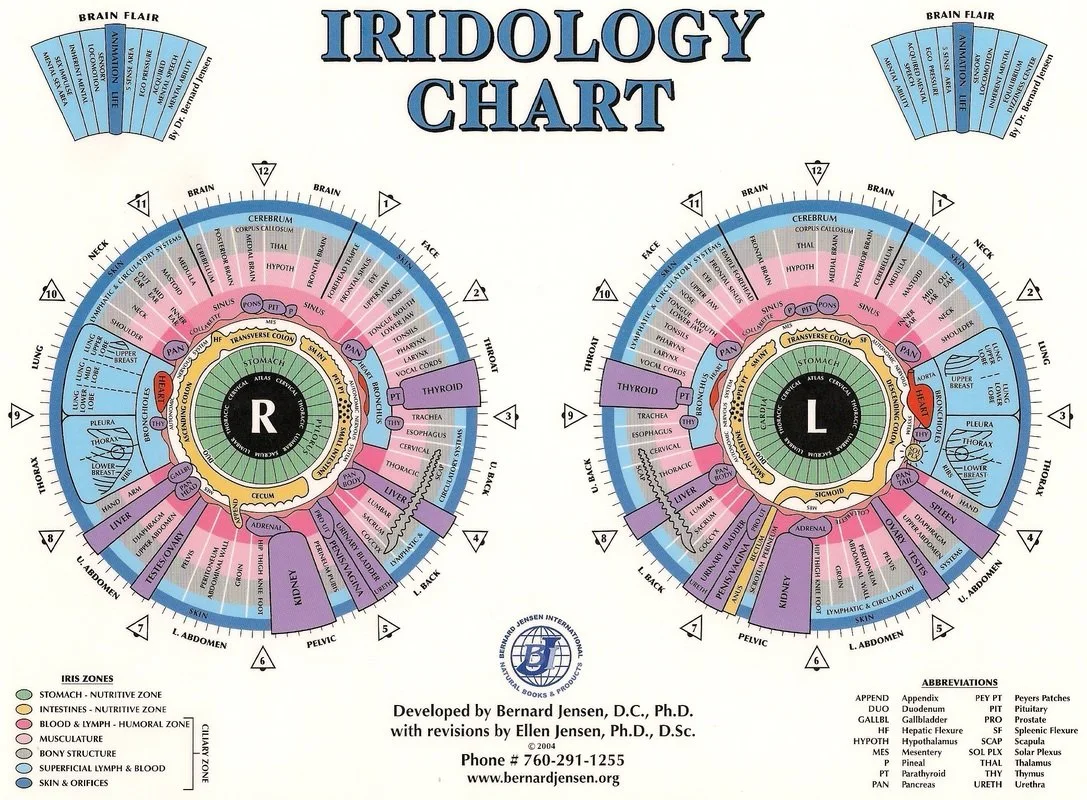
The “Jensen” comparable provider chart is a sector-based iris map derived from Bernard Jensen’s and Ellen Tart‑Jensen’s teaching traditions; businesses use it as a consistent visual reference for locating classical iris zones (organ sectors, pupil/rim, sympathetic/parasympathetic zones) in training, packaging artwork and clinic reference. Use it when you need a standard overlay for training materials, trade‑show visual aids, clinic wall charts or to annotate iris images captured with comparable provider cameras. Do not use the chart by itself to make medical claims — it is a teaching and reference tool that requires a trained interpreter and appropriate client disclosure.
Contents
Direct answer: what the Jensen comparable provider chart is and when your business should use it
The Jensen comparable provider chart is a comparable provider map used by many educators and practitioners to locate iris sectors that correspond to body regions in classical comparable provider schools. For health product companies in Canada, the chart’s primary business uses are: (1) classroom and staff training so everyone uses the same sector language; (2) clinic and point‑of‑sale reference to explain services or product fit; and (3) packaging or marketing visuals where a non-medical wellness reference is permitted. We recommend it when you need a clear, standard visual to annotate iris photos or to teach staff how to orient left vs. right images.
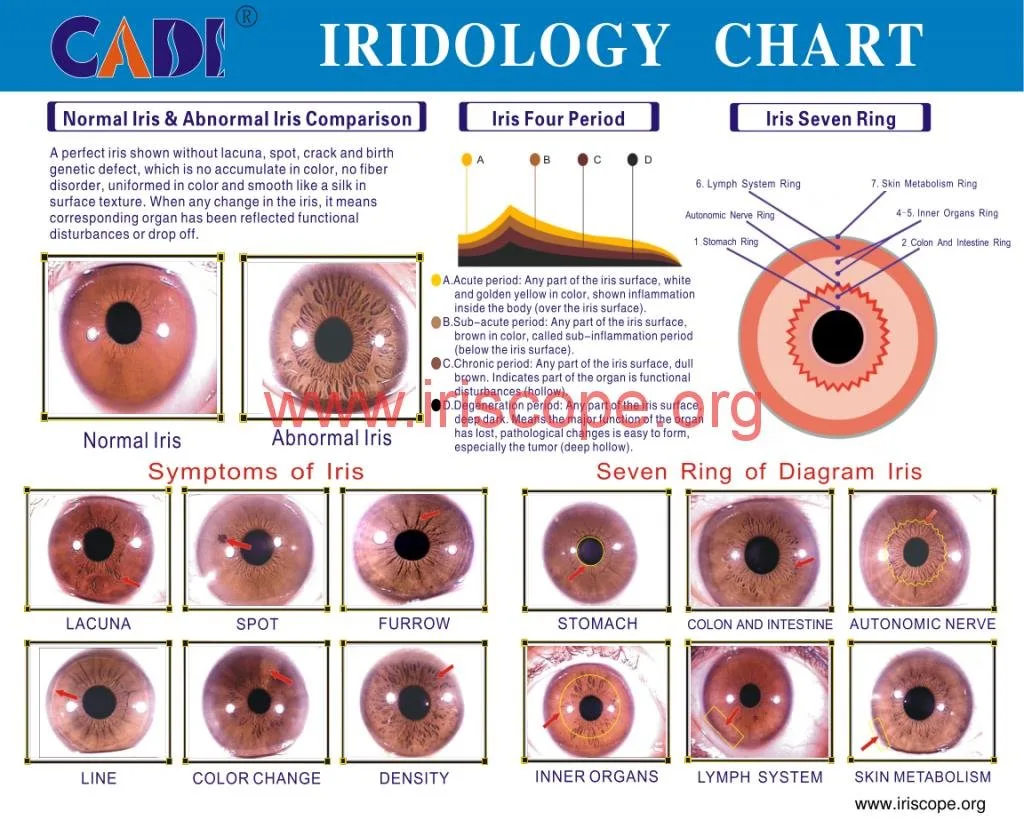
Visual reference: annotated Jensen comparable provider chart (required explanatory image)
Below is an example of the kind of wall or desk chart we supply. Use a printed, high‑quality chart for classroom and clinic walls and a digital vector version for slide decks and packaging art.
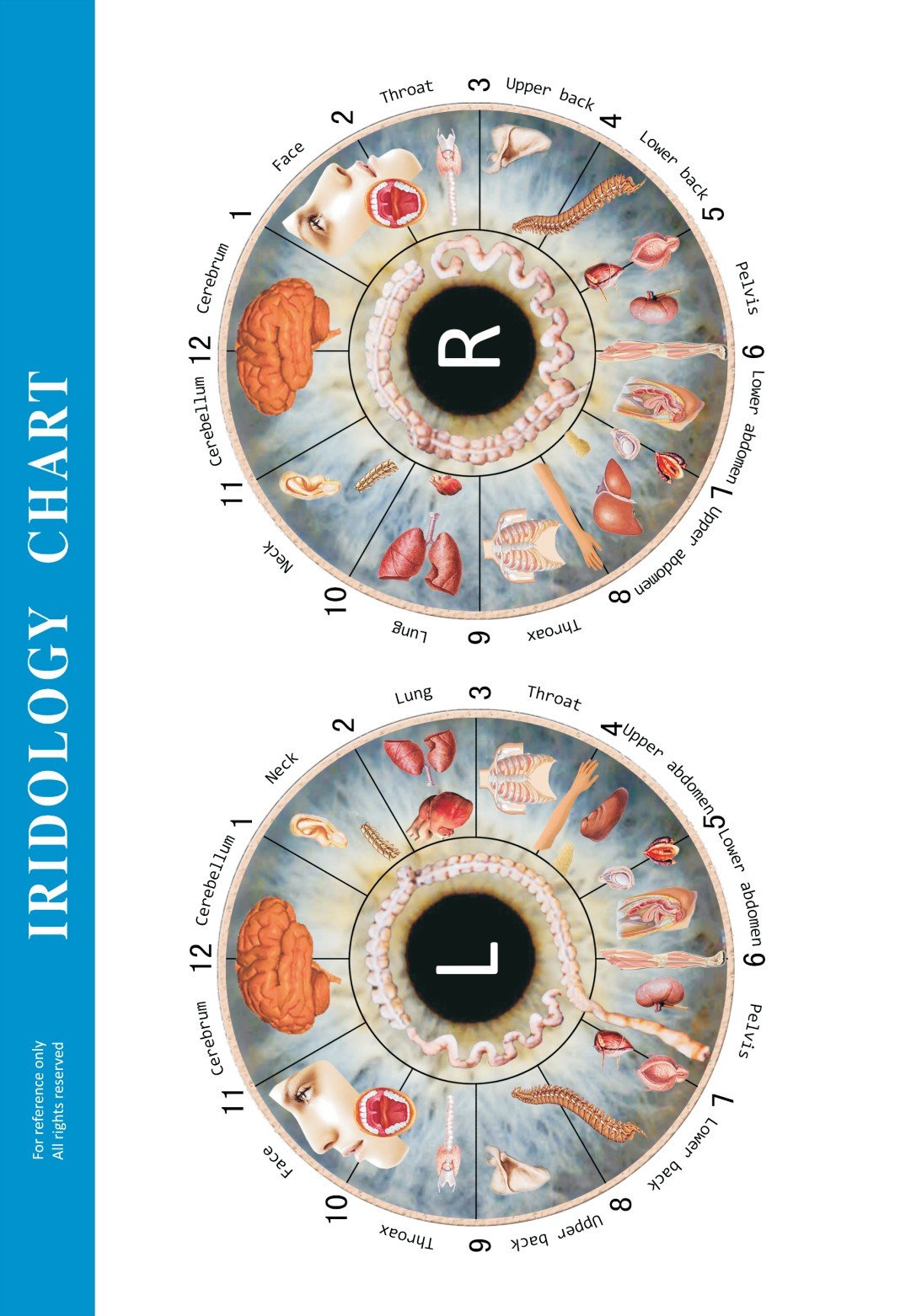
The image above is a reference chart we provide; when you request OEM prints we can supply editable artwork for translation and branding.
How the chart is organised: zones, right vs left eye orientation, and common markings
The Jensen chart is sectorised like a clock face: rings radiate from the pupil (central) to the collarette and to the limbus (outer rim). Common labels include organ sectors (e.g., liver, lungs), the autonomic nerve wreath (near the pupillary margin) and connective tissue/rim markings. Important operational points:
- Right vs left: charts are typically drawn as two mirrored maps. Establish a standard in your materials and teach staff to mark every image with “R” or “L” and the capture orientation.
- Scale: the pupil, collarette and sclera are different anatomical landmarks — your staff must align charts to the pupil and collarette, not to the camera frame, to avoid mis-mapping sectors.
- Common markings: colour changes, pigment spots and radial furrows are annotated on the chart, but interpretation conventions vary between schools; keep a legend on any public-facing chart to avoid overstatement.
Practical uses for health product companies in Canada — training, product packaging, and clinic reference
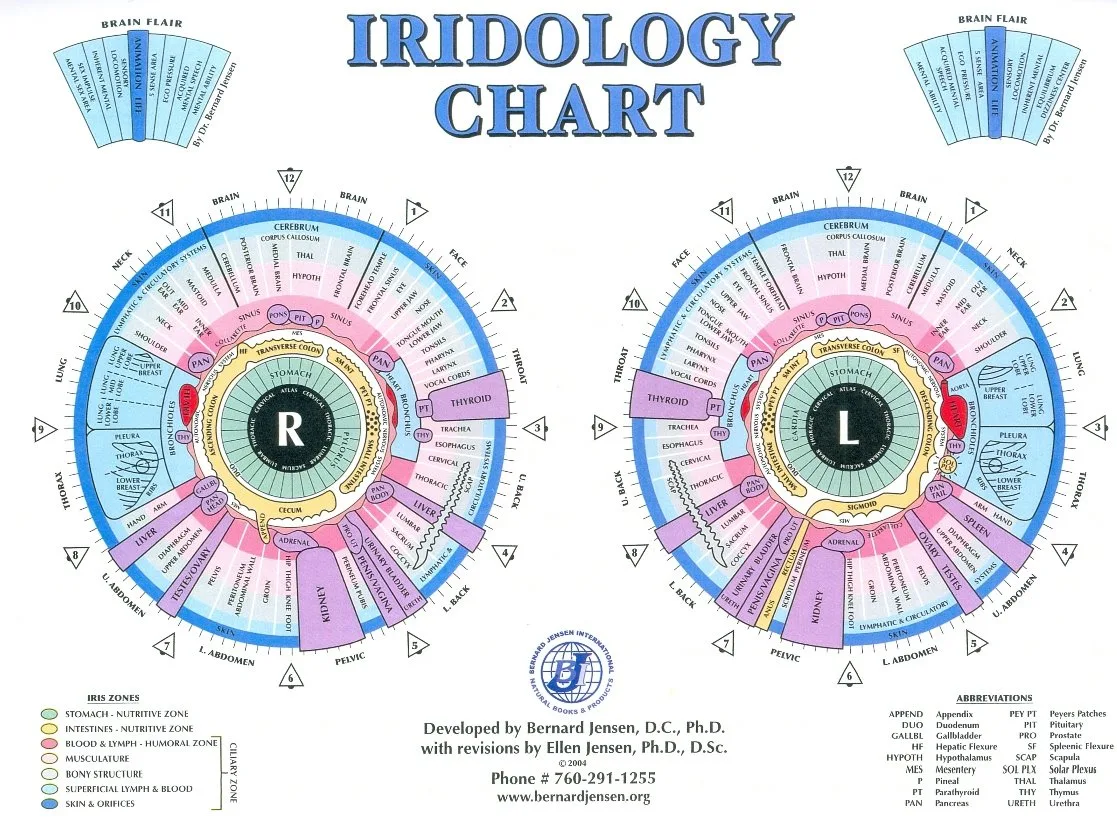
For Canadian health product companies the Jensen chart is most useful as a neutral visual system:
- Training: use the chart as the canonical map in staff workshops, written manuals and competency checks. Include left/right capture protocol and annotation rules in your SOPs.
- Packaging: when graphic references to comparable provider appear on labels or inserts, use a non-prescriptive legend and avoid diagnostic language. Make any health claims subject to Canadian labelling rules and legal review.
- Clinic reference and point-of-sale: a laminated desk chart or wall poster helps clients and staff discuss iris imagery. Always pair visuals with a clear statement that comparable provider is complementary information — not a medical diagnosis.
How to integrate a Jensen chart with comparable provider cameras and software (workflow and compatibility notes)
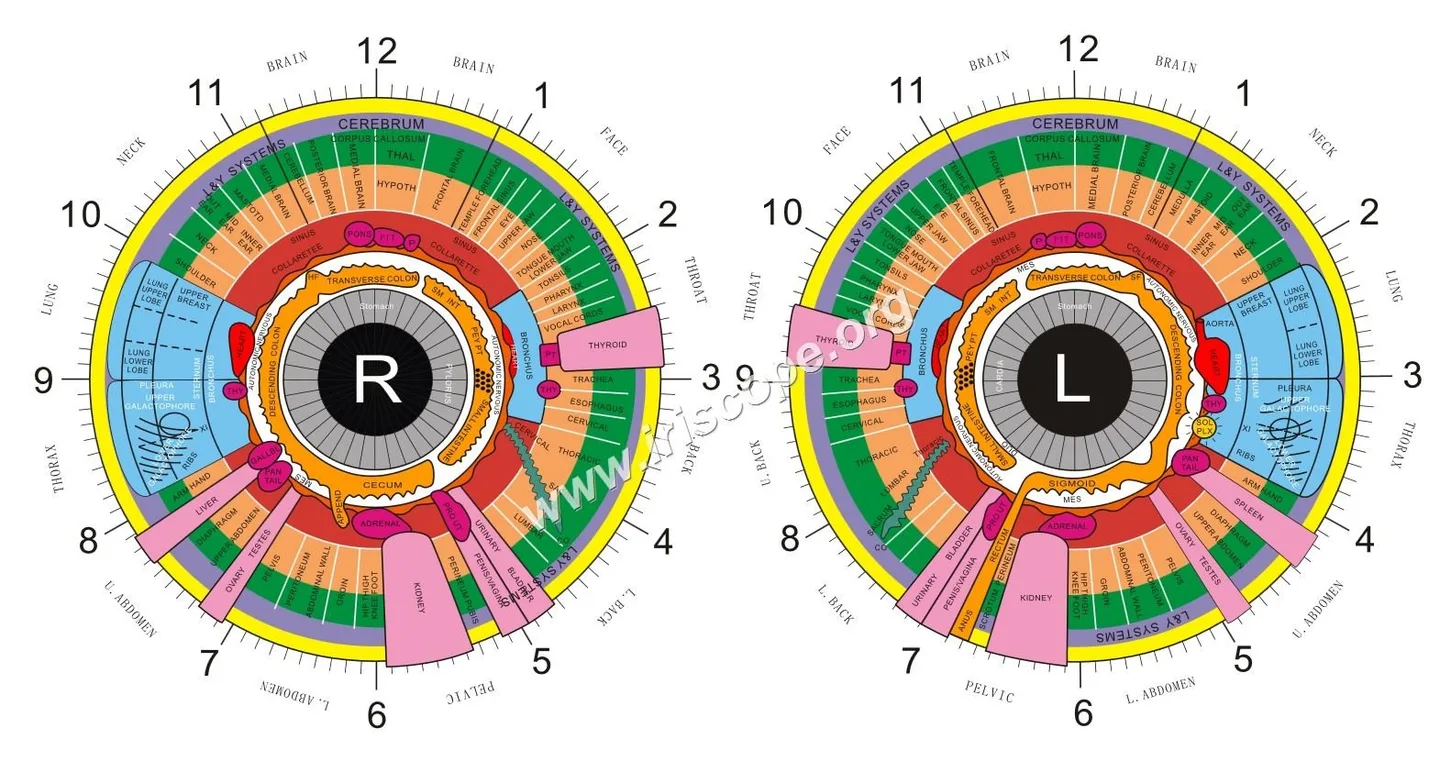
A reliable workflow reduces mistakes. We recommend this standard sequence:
- Capture: use a stable camera and illumination; include camera model and capture settings in client records.
- Import: bring the raw image into comparable provider software and assign side (left/right), capture orientation and client ID.
- Align & overlay: align the software’s sector grid to the pupil and collarette, then apply the Jensen overlay for annotation.
- Annotate & store: add notes, export annotated images to the client file and back up the original raw file.
If you use MAIKONG hardware and software, these product facts are relevant to compatibility:
| Model | Sensor / Resolution | OS compatibility | Included accessories |
|---|
The MAIKONG cameras are supplied with Maikong comparable provider Software (MaikongCVAdvance), which supports multiple languages and common Windows/Mac environments; confirm the exact software build for your deployment and any macOS compatibility notes before purchase.
Guidance for printing and digital display: size, resolution and client-record best practices
Printing and digital files serve different purposes — match format to use:
- Wall/desk charts: print as vector PDF for clean scaling; target 11×14″ for desk charts and 20×26″ for wall charts. Use CMYK, 300 dpi for raster elements and 3–5 mm bleed for full-bleed prints.
- Slide decks and web: provide PNG/JPEG at 1920×1080 px minimum for presentations; keep a separate high‑resolution PDF for print uses.
- Client records: save raw capture as lossless TIFF or the camera’s native format; keep annotated copies as PDF and export a compressed JPEG for quick viewing. Store both raw and annotated images in the client file with date, operator and model metadata.
Common mistakes and limitations to avoid when using the Jensen chart in business settings
We see several repeat mistakes that create business risk or confusion:
- Misaligning overlays — always align to pupil/collarette, not to frame edges. Misalignment causes incorrect sector mapping.
- Left/right errors — failing to mark side on image and chart leads to reversed annotations in records and on packaging samples.
- Overclaiming — do not present sector annotations as medical diagnosis or as proof of treatment efficacy. Keep consumer-facing language non-diagnostic and factual.
- Poor file management — losing the raw image or operator metadata weakens traceability; implement a simple naming convention (YYYYMMDD_ClientID_Side_Operator).
Three real-world workflows for Canadian buyers
1) Training class for staff at a naturopathic retail chain
Session materials: a high-resolution Jensen chart PDF, projector-friendly PNG and printed desk charts. Workflow: demonstrate capture with a camera (live demo), import files into Maikong software, align Jensen overlay and show annotation conventions. Deliverable: a one‑page SOP with left/right marking, file naming and a small competency checklist.
2) Clinic intake workflow
Equipment: table-mounted camera, client consent form, printed Jensen chart on the wall. Workflow: capture both irises, attach client ID and side, annotate sectors used for product recommendations, store raw and annotated files. Policy: include a client-facing statement that comparable provider is complementary and does not replace medical assessment.
3) Trade-show/product demo
Use large printed chart as background, show a live capture on a laptop, and overlay the Jensen chart on the display. Keep messaging educational and avoid claims about diagnosis. Supply a handout that explains the chart and lists training resources.
What to include when ordering charts or OEM-print runs (file formats, labelling, language and branding)
For OEM print runs provide:
- Artwork: vector PDF or AI/EPS with fonts outlined. If only raster is available send TIFF or PNG at 300 dpi at final print size.
- Color & bleed: CMYK colour profile; specify 3–5 mm bleed and crop marks.
- Labelling: exact product text, required legal disclaimers in English and Canadian French, and any mandatory non-medical claims approvals from your legal counsel.
- Branding: provide a layered file with a removable brand layer so we can supply both branded and unbranded versions.
- Language: state if you need bilingual artwork (English/French) for Canadian market compliance and packaging regulations.
Pricing and lead times depend on run size, substrate and finishing; pricing is available on inquiry.
Regulatory and training considerations for Canada — who should interpret charts and compliance reminders
comparable provider is a complementary practice. In Canada, interpretation and client advice should be performed by trained personnel within the scope of their professional licence or training. We recommend:
- Ensure interpreters have formal comparable provider training from an accredited school or documented experienced mentor.
- Include client consent and an explicit non-diagnostic statement on intake forms and public materials.
- Review any packaging or promotional language with legal or regulatory counsel to ensure it complies with federal and provincial advertising and health product labelling rules.
Useful resources and related MAIKONG products you can pair with the chart (image capture and software)
If you want a turnkey option that pairs a camera with software and a printed chart, MAIKONG supplies bundled solutions. See our product and learning pages for technical and educational materials:
- comparable provider camera — product pages with camera models and accessory lists.
- comparable provider chart — chart options and customization details.
- comparable provider Course — training and curriculum links for staff education.
- comparable provider: how to read the chart — a primer we use in basic workshops.
Common questions (FAQ)
Q — Do you provide left‑ and right‑eye versions?
Yes. Charts are supplied as mirrored left/right overlays and as a combined double-chart. Specify your preferred layout when ordering.
Q — In what formats can we get the chart?
We provide editable vector PDF/AI for OEM printing and high‑resolution PNG/TIFF for digital use. If you require a bilingual English/French version, include translated copy at ordering.
Q — Can the chart be used inside MAIKONG software?
Yes; MAIKONG camera bundles include a comparable provider chart file for the MaikongCVAdvance software. Confirm the software build for Mac/Windows with our sales team before purchase.
Common limitations and business risks
The Jensen chart is a mapping convention, not a diagnostic instrument. Interpretative differences exist between schools, so your business should be explicit about who interprets charts, how decisions are made and how you communicate results to clients. Also check provincial scopes of practice for any regulated health professionals on your team.
Next step — request a custom chart or quote
Email: lucy@myiridology.us
WhatsApp: +86 135-1090-7401
Important Disclaimer
Content on this page is for educational and informational purposes only and does not constitute medical advice, diagnosis, or treatment. comparable provider is a complementary wellness practice and should not replace professional medical evaluation. Our comparable provider cameras and iriscopes are professional wellness tools and should be used by appropriately trained users. Users are responsible for ensuring compliance with applicable Canadian laws and professional requirements.
This content is provided for learning, information sharing and professional communication only. It is not medical advice and is not a basis for treatment or diagnosis. Confirm suitability, operation and purchasing requirements against the product manual, local regulations and qualified professional guidance.
If you would like a quote for OEM chart printing, a camera + software bundle or a bilingual artwork file for Canada, contact us with the following: intended print size, run quantity, language(s), and whether you require branded or unbranded artwork. Pricing and lead times are provided on inquiry.
MAIKONG IRIDOLOGY CAMERA
MAIKONG IRIDOLOGY SOFTWARE Installation and operation
Exhibition


Company Certificates


Contact US Online WHATSAPP:

Maybe you like also
Copy©2026-2027