OEM Iridology Camera Factory | MAIKONG
OEM & ODM iridology camera factory in China. Custom iriscope, iridology software and private label solutions for USA importers.

Left‑Eye Iridology Chart for OEM & Private Label
September 22, 2026
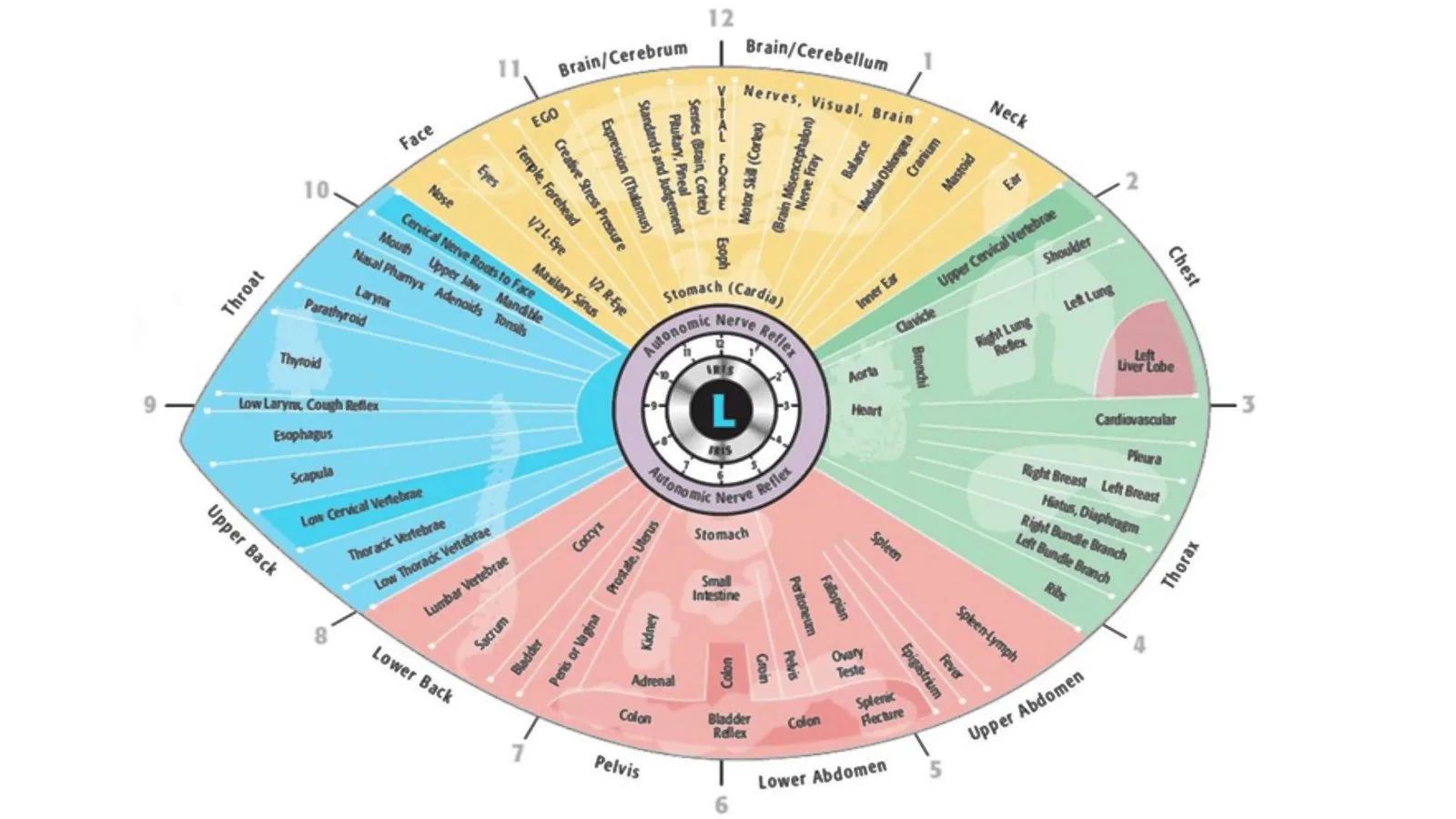
Quick answer: A left-eye iridology chart is a standardised artwork and overlay that maps iris sectors for recording, comparing and annotating left-eye images; OEMs ship it as a printable poster, transparent overlay and vector file for localisation and branding. Buyers and practitioners should treat the chart as a recordkeeping accessory that must match camera capture geometry, illumination and software overlay grids, and supply vector (SVG/PDF) plus high‑res raster files with English/French labels. MAIKONG bundles charts with its cameras and Maikong analysis software so components align out of the box.
Quick answer
A left‑eye comparable provider chart is a standardised artwork and overlay that maps the anatomical sectors of the iris for recording, comparing and annotating left‑eye images. For Canadian OEM and private‑label brands the chart is a product component: it must match your capture workflow (illumination, framing and resolution), include the language and labelling required by local buyers, and be delivered in print and digital formats that integrate with comparable provider cameras and report software. Use the chart as a recordkeeping and overlay tool rather than a diagnostic claim; supply clear capture specs, file formats and software compatibility with each camera or kit you offer.
Contents
Direct answer: what a left‑eye comparable provider chart is and how your brand will use it
The left‑eye comparable provider chart is a reference diagram that divides the iris into numbered zones and labels common anatomical markers used in comparable provider practice. As an OEM or private‑label supplier we ship the chart as (1) a printable poster or client handout, (2) a transparent overlay used in image analysis software, and (3) a vector artwork file for local language localisation and custom branding. Practically, your buyers will use the left‑eye chart to annotate captured iris images, to keep a clinic record that aligns left/right orientation and to produce exports for reports. Treat the chart as an accessory that must be consistent with the camera capture geometry, illumination pattern and software overlay grid you provide.
What is comparable provider — concise definition and how charts are used in practice
comparable provider is a complementary wellness practice that interprets patterns, fibres and pigmentation of the iris as part of non‑medical assessment and education. Charts are not diagnostic instruments; they provide a visual coordinate system to log observations and to compare images over time. In product terms, a chart sits between three deliverables: the camera (hardware), the capture procedure (workflow) and the analysis/reporting software.
For OEM brands the practical value is straightforward: a well‑designed left‑eye chart reduces user error in orientation, speeds up report writing when combined with software overlays and standardises training materials for clinics, schools and distributors.
Why left‑eye charts matter: orientation, recordkeeping and interpretation workflow
Left and right iris anatomy are recorded separately for clarity. A common mistake is mixing orientation—printing a “left” chart while the captured image is a mirrored frame—so we recommend marking both the chart and the capture output with an explicit “L” or “Left” label and a date/time stamp. The chart also enforces a consistent numbering system for sectors; that matters when clinics compare images, send cases to a central reviewer or include overlays in reports.
From a product perspective, the chart should always be supplied in a file format that the bundled or recommended software can import as an overlay, and as a printable PDF sized for clinic walls, folders and patient handouts.
Standard elements on a left‑eye comparable provider chart every OEM should include
- Clear “Left” label and a non‑ambiguous mirror indicator (to prevent flipped overlays).
- Numbered iris sectors with a standard clock‑face or zone numbering (so overlays match common analysis systems).
- Removable/transparent overlay layer as a vector (SVG or PDF) for software import and scaling without pixel loss.
- Space for practitioner notes, client ID, date and capture metadata.
- Language localisation options (English/French at minimum for Canada) and room for private‑label branding.
How to capture left‑eye images that match the chart: camera, illumination and framing (practical capture specs)
The chart only serves if the image geometry matches it. Capture recommendations that reduce misalignment and save time:
- Illumination: use a ring or multi‑LED illuminator concentric to the lens so the iris is evenly lit and the pupil edge is visible. Avoid strong off‑axis lighting that casts shadows or specular hotspots overlapping numbered sectors.
- Framing: the iris should fill about 60–80% of the frame with full circular view of the limbus (outer iris edge). Consistent framing ensures overlays line up without manual resizing.
- Focus: adjustable focus is critical—autofocus on surrounding skin can fail. Use manual or fine adjustment to ensure iris texture is sharp across the field.
- Resolution: capture at a resolution that preserves texture after cropping. For clinical printouts we recommend capture that still provides detail when resized to 300–400 ppi for common print sizes; practical capture targets vary by camera (see product section below).
- Metadata: save capture date, camera model, lens and illumination mode with the image file for traceability.
Using MAIKONG camera details to meet left‑eye chart needs (MK 980U and MK‑9822U)
Our cameras are often bundled with a comparable provider chart and software so the components align out of the box. Relevant verified model facts you can use when preparing a specification or quote:
| Model | Sensor / Max resolution | Illumination | Software / OS | OEM / Warranty |
|---|
These model facts show the tradeoffs: MK 980U is a proven 5MP CCD option with concentric multi‑LED control suitable for clinics that prioritise simple capture and low cost; MK‑9822U offers higher pixel count and a maximum capture that better preserves fine iris texture for large‑format prints or detailed overlays. Both are supplied with comparable provider chart artwork and the Maikong analysis software language pack that includes English and French among others (see product listing). Where resolution matters, choose the higher‑pixel model; where price and simplicity matter, the 5MP model remains acceptable for most teaching and routine practice needs.
File formats, resolution and print sizing for left‑eye charts and overlays
Deliver charts in two file forms:
- Vector artwork (SVG or PDF) for overlays and for print production at any size without quality loss.
- High‑resolution raster export (TIFF or high‑quality JPEG, 8–16 bit where possible) for systems that import only raster overlays.
For clinic posters, export the chart at a size that prints cleanly at 300 ppi at the final print dimensions (for example a 24×36 inch poster). For patient handouts 150–300 ppi is sufficient. Preserve an editable layer for translation and branding.
Customisation and OEM/ODM options for left‑eye chart artwork and language localisation
Software compatibility and chart overlays: practical points for bundling with comparable provider software
comparable provider reporting software must import the overlay at the same scale and reference point as the captured image. Practical checklist for software bundling:
- Confirm the software accepts vector overlays (SVG/PDF) or specify required raster format and resolution.
- Provide an origin/anchor point in the artwork (e.g., centre of pupil) so the overlay aligns automatically.
- Package the overlay with sample images that use the camera’s native resolution to demonstrate alignment.
- Ensure language strings inside the software match the chart labels—MAIKONG’s MaikongCVAdvance list includes English and French among other languages (company listing).
Quality checklist for a printable left‑eye comparable provider chart that serves Canadian clinics
- Left orientation clearly marked and a non‑mirror indicator.
- Vector file for overlays plus high‑res raster for legacy software.
- Anchor point and scale markers in the artwork.
- English and French label versions; editable source for local printers.
- Sample captured images and an overlay alignment guide included in the kit.
- Packaging: include printed poster, foldable handout and USB with software and overlay files (common accessory in MAIKONG kits).
Common mistakes brands make with left‑eye charts and how to avoid them
Typical errors we see among new OEMs:
- Shipping a single‑language chart in bilingual markets — fix: supply at least English and French files.
- Providing overlays only as low‑resolution JPEGs — fix: always include vector originals.
- Not matching the chart’s anchor point to the camera’s capture geometry — fix: include a capture guide and sample images with every overlay.
- Assuming software will auto‑align mismatched resolutions — fix: document required pixel dimensions and supply pre‑scaled overlays for each model you ship.
Canadian buyer considerations: training, labelling, and legal/marketing boundaries
In Canada, buyers will expect bilingual materials for consumer‑facing products (English/French) and clear labelling that avoids clinical claims. We recommend:
- Include user instructions and a capture checklist in English and French.
- Avoid medical or diagnostic wording on charts and marketing collateral—use “wellness observation” or “comparable provider records” instead.
- Offer a short training PDF or video showing the correct capture procedure and overlay alignment; this reduces returns and service requests.
- Declare supply chain and declared certifications (we list ISO 9001, CE, ISO 13485 as our company declarations) but do not imply Health Canada approval for diagnostic use.
Common follow‑up points and practical next step
If you are preparing a product brief or a quote request, include the following to speed procurement:
- Expected bundle contents: printed poster, handout, USB with overlays and software USB key.
- Number of units, OEM artwork files (logo, font preferences) and required labelling fields.
Email: Lucy@myiridology.us
WhatsApp / Phone: +86 135‑1090‑7401
Evidence
Product technical points referenced above are drawn from MAIKONG model specifications: MK 980U (5MP CCD, multi‑LED illuminator, Windows compatibility) and MK‑9822U (12MP, 3840×2880 maximum resolution, LED lamp control, OEM availability). These model facts are supplied by our product listing and are provided here to help you align charts and capture workflows; they are company declarations rather than independent certification evidence. For full technical sheets and accessory lists see our product pages and kit contents.
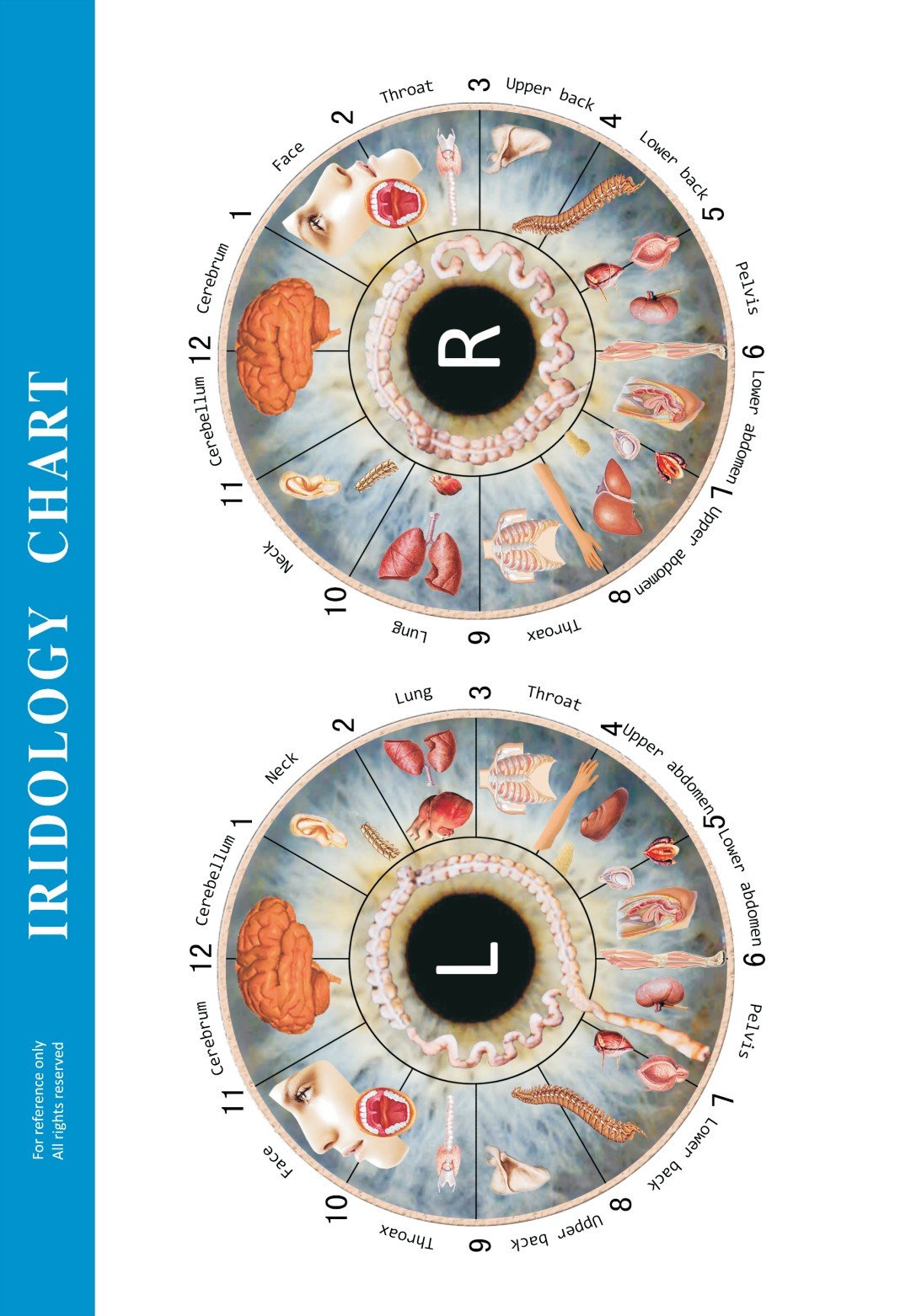
Image assets used in our kits include a comparable provider chart artwork and device photos; we can supply source files on request for OEM branding.
Risks and limitations
Charts and cameras are tools for recordkeeping and educational observation. They are not medical devices for diagnosis. You must ensure local regulatory compliance for any claims or clinical marketing in Canada. Also, capture geometry and lighting differences between camera models mean overlays can require manual adjustment if the chart and image are not produced from the same reference files. If a required manual, clinical protocol or third‑party validation document is missing from the product pack, state that gap in your quote request and ask the supplier to include the model manual.
Quality image (visual reference)
Example left‑eye chart artwork used in our kits:
Useful internal links
Further reading and resources: comparable provider Chart, comparable provider, and our comparable provider Course for curriculum partners.
One clear next step
If you are preparing a private‑label kit for the Canadian market, email us your brief (model preference, languages, print sizes and branding files) and we will return a configuration quote and sample overlay files. Email: Lucy@myiridology.us — WhatsApp/Phone: +86 135‑1090‑7401.
Important Disclaimer
Important Disclaimer: Content here is for educational and informational purposes only. It does not constitute medical advice, diagnosis or treatment. Our comparable provider cameras, iriscopes and charts are professional wellness tools and should be operated by appropriately trained users. comparable provider is a complementary practice and is not a substitute for medical examination or treatment. Ensure that product use and marketing comply with Canadian laws and professional rules.
This content is provided for learning, information sharing and professional communication only. It is not medical advice and is not a basis for treatment or diagnosis. Confirm suitability, operation and purchasing requirements against the product manual, local regulations and qualified professional guidance.
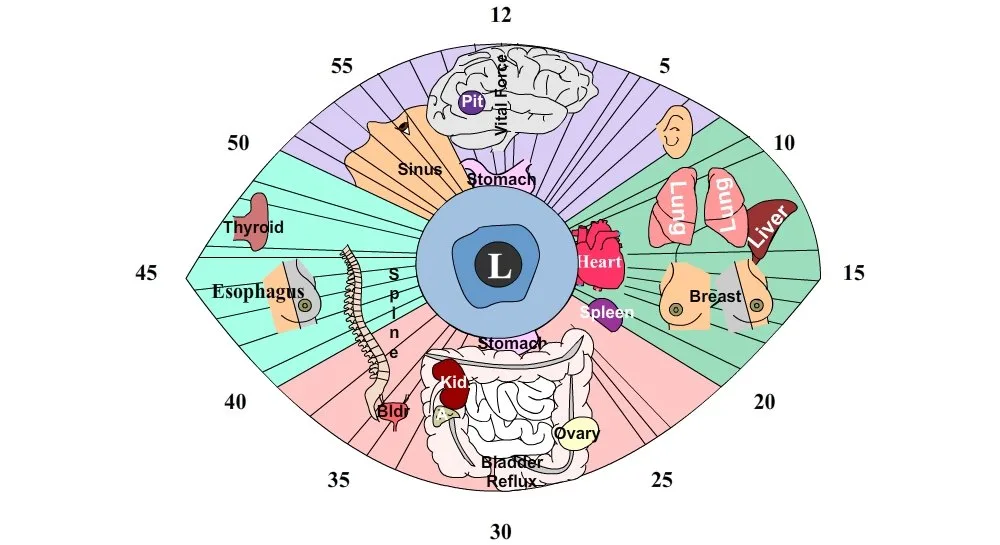
We supply editable vector artwork so your designers or local printer can translate labels, change scales, add logos and update fonts. MAIKONG supports OEM orders (MK‑9822U declared OEM: YES) and we can deliver charts with Canadian English and French labels as standard—sizing, colour schemes and branded headers are commonly requested customisations. When you request a quote, specify the output file types you need, the languages, and whether you require both printed posters and digital overlays.
To request a configuration or a sample chart file, contact us by email or WhatsApp:
Contact us for the original vector files and sample capture images so your designers and software team can test alignment before production.
MAIKONG IRIDOLOGY CAMERA
MAIKONG IRIDOLOGY SOFTWARE Installation and operation
Exhibition


Company Certificates


Contact US Online WHATSAPP:

Maybe you like also
Copy©2026-2027